

XLA:GPU में HLO के लिए कोड जनरेट करने के तीन तरीके हैं.
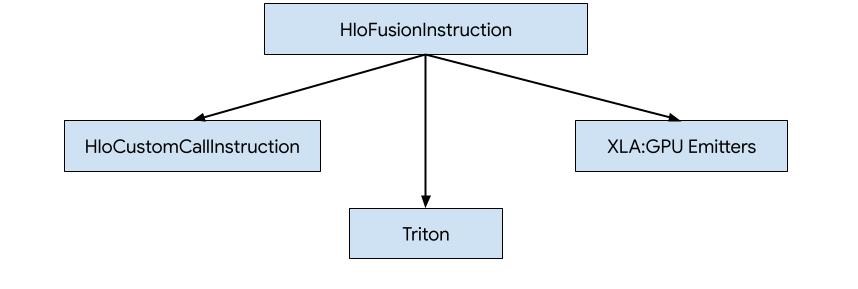
- एचएलओ को बाहरी लाइब्रेरी के कस्टम कॉल से बदलें. उदाहरण के लिए, NVidia cuBLAS, cuDNN.
- एचएलओ को ब्लॉक-लेवल पर टाइल करना और फिर OpenAI Triton का इस्तेमाल करना.
- XLA Emitters का इस्तेमाल करके, HLO को धीरे-धीरे LLVM IR में बदला जाता है.
यह दस्तावेज़, XLA:GPU Emitters पर आधारित है.
हीरो-आधारित कोड जनरेशन
XLA:GPU में सात तरह के एमिटर होते हैं. हर एमिटर टाइप, फ़्यूज़न के "हीरो" से मेल खाता है. इसका मतलब है कि फ़्यूज़ किए गए कंप्यूटेशन में सबसे अहम ऑप, पूरे फ़्यूज़न के लिए कोड जनरेट करता है.
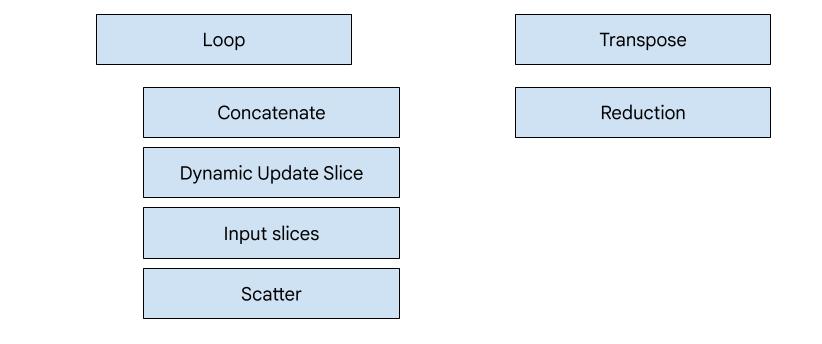
उदाहरण के लिए, अगर फ़्यूज़न में HloTransposeInstruction मौजूद है, तो ट्रांसपोज़ एमिटर को चुना जाएगा. इसके लिए, शेयर की गई मेमोरी का इस्तेमाल करना ज़रूरी है, ताकि मेमोरी को पढ़ने और लिखने के पैटर्न को बेहतर बनाया जा सके. रिडक्शन एमिटर, शफ़ल और शेयर की गई मेमोरी का इस्तेमाल करके रिडक्शन जनरेट करता है. लूप एमिटर, डिफ़ॉल्ट एमिटर होता है. अगर किसी फ़्यूज़न में ऐसा हीरो नहीं है जिसके लिए हमारे पास खास इमिटर है, तो लूप इमिटर का इस्तेमाल किया जाएगा.
खास जानकारी
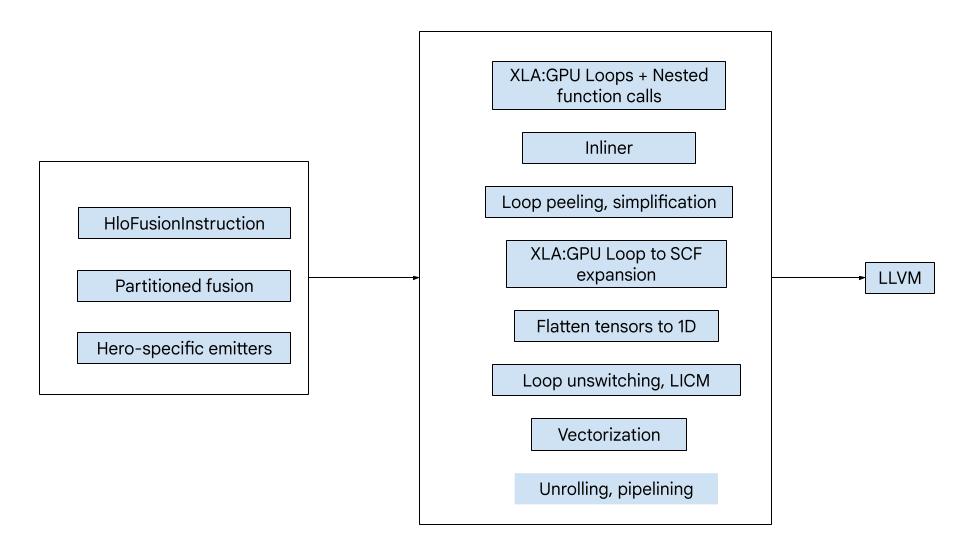
कोड में ये मुख्य कॉम्पोनेंट शामिल होते हैं:
- कंप्यूटेशन पार्टीशनर - HLO फ़्यूज़न कंप्यूटेशन को फ़ंक्शन में बांटना
- एमिटर - एमएलआईआर में पार्टिशन किए गए HLO फ़्यूज़न को बदलना (
xla_gpu,tensor,arith,math,scfडायलैक्ट) - कंपाइलेशन पाइपलाइन - यह LLVM के लिए IR को ऑप्टिमाइज़ करती है और कम करती है
पार्टिशन करना
computation_partitioner.h देखें.
नॉन-एलिमेंटवाइज़ एचएलओ निर्देशों को हमेशा एक साथ नहीं भेजा जा सकता. इस एचएलओ ग्राफ़ पर ध्यान दें:
     param
       |
      log
      |  \
      |  transpose
      |  /
      add
अगर हम इसे एक ही फ़ंक्शन में शामिल करते हैं, तो log के हर एलिमेंट के लिए, log को दो अलग-अलग इंडेक्स पर ऐक्सेस किया जाएगा.add पुराने एमिटर, log को दो बार जनरेट करके इस समस्या को हल करते हैं. इस ग्राफ़ के लिए, यह कोई समस्या नहीं है. हालांकि, जब एक से ज़्यादा स्प्लिट होते हैं, तो कोड का साइज़ तेज़ी से बढ़ता है.
यहां, हम ग्राफ़ को ऐसे हिस्सों में बांटकर इस समस्या को हल करते हैं जिन्हें एक फ़ंक्शन के तौर पर सुरक्षित तरीके से दिखाया जा सकता है. मानदंड निम्न हैं:
- जिन निर्देशों को सिर्फ़ एक उपयोगकर्ता ने दिया है उन्हें उपयोगकर्ता के साथ सुरक्षित तरीके से भेजा जा सकता है.
- अगर एक ही इंडेक्स के ज़रिए कई उपयोगकर्ता किसी निर्देश को ऐक्सेस करते हैं, तो उस निर्देश को उपयोगकर्ताओं के साथ एक साथ जारी किया जा सकता है.
ऊपर दिए गए उदाहरण में, add और tranpose, log के अलग-अलग इंडेक्स ऐक्सेस करते हैं. इसलिए, इसे इनके साथ एक साथ नहीं भेजा जाना चाहिए.
इसलिए, ग्राफ़ को तीन फ़ंक्शन में बांटा गया है. हर फ़ंक्शन में सिर्फ़ एक निर्देश होता है.
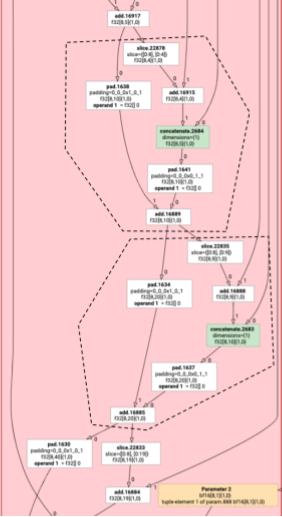
यह बात add के slice और pad वाले इस उदाहरण पर भी लागू होती है.
मूल तत्व का उत्सर्जन
elemental_hlo_to_mlir.h देखें.
एलिमेंटल इमिशन, HloInstructions के लिए लूप और गणित/अंकगणित के ऑपरेशंस बनाता है. ज़्यादातर मामलों में, यह प्रोसेस आसान होती है. हालांकि, यहां कुछ दिलचस्प चीज़ें भी होती हैं.
इंडेक्सिंग से जुड़े बदलाव
कुछ निर्देश (transpose, broadcast, reshape, slice, reverse और कुछ अन्य) सिर्फ़ इंडेक्स में बदलाव करते हैं: नतीजे का कोई एलिमेंट जनरेट करने के लिए, हमें इनपुट का कोई दूसरा एलिमेंट जनरेट करना होता है. इसके लिए, हम XLA के indexing_analysis का फिर से इस्तेमाल कर सकते हैं. इसमें किसी निर्देश के लिए, इनपुट से आउटपुट की मैपिंग बनाने वाले फ़ंक्शन होते हैं.
उदाहरण के लिए, transpose से [20,40] तक [40,20] के लिए, यह इंडेक्सिंग मैप जनरेट करेगा (हर इनपुट डाइमेंशन के लिए एक अफ़ाइन एक्सप्रेशन; d0 और d1 आउटपुट डाइमेंशन हैं):
  (d0, d1) -> d1
  (d0, d1) -> d0
इसलिए, इंडेक्स ट्रांसफ़ॉर्मेशन के इन निर्देशों के लिए, हम सिर्फ़ मैप पा सकते हैं. साथ ही, इसे आउटपुट इंडेक्स पर लागू कर सकते हैं और नतीजे के तौर पर मिले इंडेक्स पर इनपुट जनरेट कर सकते हैं.
इसी तरह, pad op ज़्यादातर लागू करने के लिए इंडेक्सिंग मैप और कंस्ट्रेंट का इस्तेमाल करता है. pad भी इंडेक्सिंग ट्रांसफ़ॉर्मेशन है. इसमें कुछ और जांचें भी शामिल हैं, ताकि यह पता चल सके कि हम इनपुट का कोई एलिमेंट या पैडिंग वैल्यू दिखाते हैं या नहीं.
टपल
हम इंटरनल tuples का इस्तेमाल नहीं करते. हम नेस्ट किए गए tuple
आउटपुट का इस्तेमाल करने की अनुमति भी नहीं देते. इन सुविधाओं का इस्तेमाल करने वाले सभी XLA ग्राफ़ को ऐसे ग्राफ़ में बदला जा सकता है जिनमें इन सुविधाओं का इस्तेमाल नहीं किया जाता.
इकट्ठा करना
हम सिर्फ़ gather_simplifier के बनाए गए कैननिकल गैदरिंग को स्वीकार करते हैं.
सबग्राफ़ फ़ंक्शन
%p0 से %p_n पैरामीटर वाले कंप्यूटेशन के सबग्राफ़ और r डाइमेंशन और एलिमेंट टाइप (e0 से e_m) वाले सबग्राफ़ रूट के लिए, हम एमएलआईआर फ़ंक्शन के इस सिग्नेचर का इस्तेमाल करते हैं:
(%p0: tensor<...>, %p1: tensor<...>, ..., %pn: tensor<...>,
 %i0: index, %i1: index, ..., %i_r-1: index) -> (e0, ..., e_m)
इसका मतलब है कि हमारे पास हर कंप्यूटेशन पैरामीटर के लिए एक टेंसर इनपुट, आउटपुट के हर डाइमेंशन के लिए एक इंडेक्स इनपुट, और हर आउटपुट के लिए एक नतीजा होता है.
किसी फ़ंक्शन को एमिट करने के लिए, हम ऊपर दिए गए एलिमेंटल एमिटर का इस्तेमाल करते हैं. साथ ही, हम इसके ऑपरेंड को तब तक बार-बार एमिट करते हैं, जब तक हम सबग्राफ़ के किनारे तक नहीं पहुंच जाते. इसके बाद, हम पैरामीटर के लिए tensor.extract या अन्य सबग्राफ़ के लिए func.call जारी करते हैं
एंट्री फ़ंक्शन
हर एमिटर टाइप, एंट्री फ़ंक्शन को अलग-अलग तरीके से जनरेट करता है. इसका मतलब है कि हीरो के लिए फ़ंक्शन अलग-अलग होते हैं. एंट्री फ़ंक्शन, ऊपर दिए गए फ़ंक्शन से अलग होता है. इसकी वजह यह है कि इसमें इनपुट के तौर पर कोई इंडेक्स नहीं होता. इसमें सिर्फ़ थ्रेड और ब्लॉक आईडी होते हैं. साथ ही, इसे आउटपुट को कहीं लिखना होता है. लूप एमिटर के लिए, यह काफ़ी आसान है. हालांकि, ट्रांसपोज़ और रिडक्शन एमिटर में लिखने का लॉजिक आसान नहीं है.
एंट्री के हिसाब का सिग्नेचर यह है:
(%p0: tensor<...>, ..., %pn: tensor<...>,
 %r0: tensor<...>, ..., %rn: tensor<...>) -> (tensor<...>, ..., tensor<...>)
यहां पहले की तरह, %pns, कंप्यूटेशन के पैरामीटर हैं और %rns, कंप्यूटेशन के नतीजे हैं. एंट्री कंप्यूटेशन, नतीजों को टेंसर के तौर पर लेता है, tensor.insert उन्हें अपडेट करता है, और फिर उन्हें वापस भेजता है.
आउटपुट टेंसर का इस्तेमाल किसी और काम के लिए नहीं किया जा सकता.
कंपाइलेशन पाइपलाइन
लूप एमिटर
loop.h देखें.
आइए, GELU फ़ंक्शन के लिए HLO का इस्तेमाल करके, MLIR कंपाइलेशन पाइपलाइन के सबसे अहम पास के बारे में जानते हैं.
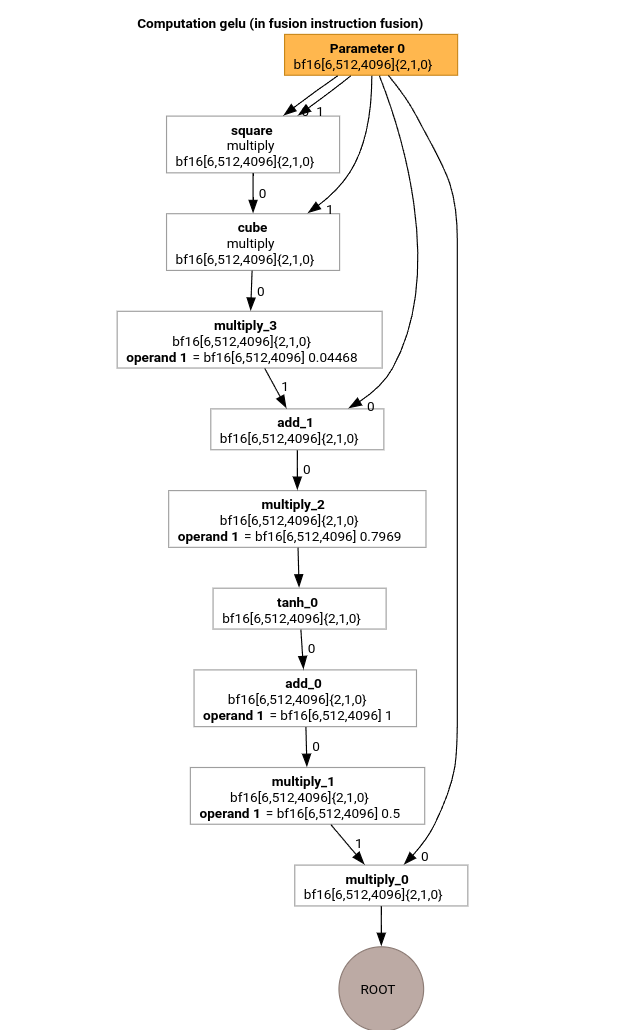
इस HLO कंप्यूटेशन में सिर्फ़ एलिमेंटवाइज़ ऑप्स, कॉन्स्टेंट, और ब्रॉडकास्ट होते हैं. इसे लूप एमिटर का इस्तेमाल करके एमिट किया जाएगा.
MLIR कन्वर्ज़न
एमएलआईआर में बदलने के बाद, हमें एक xla_gpu.loop मिलता है. यह %thread_id_x और %block_id_x पर निर्भर करता है. यह एक ऐसा लूप तय करता है जो आउटपुट के सभी एलिमेंट को एक साथ प्रोसेस करता है, ताकि यह पक्का किया जा सके कि सभी राइट ऑपरेशन एक साथ पूरे हों.
इस लूप के हर दोहराव पर, हम
   %pure_call = xla_gpu.pure_call @gelu(%input, %dim0, %dim1, %dim2)
      : (tensor<6x512x4096xbf16>, index, index, index) -> bf16
रूट ऑपरेशन के एलिमेंट का हिसाब लगाने के लिए. ध्यान दें कि हमारे पास @gelu के लिए सिर्फ़ एक आउटलाइन किया गया फ़ंक्शन है, क्योंकि पार्टीशनर ने ऐसे टेंसर का पता नहीं लगाया है जिसमें दो या उससे ज़्यादा ऐक्सेस पैटर्न हों.
#map = #xla_gpu.indexing_map<"(th_x, bl_x)[vector_index] -> ("
 "bl_x floordiv 4096, (bl_x floordiv 8) mod 512, (bl_x mod 8) * 512 + th_x * 4 + vector_index),"
 "domain: th_x in [0, 127], bl_x in [0, 24575], vector_index in [0, 3]">

func.func @main(%input: tensor<6x512x4096xbf16> , %output: tensor<6x512x4096xbf16>)
   -> tensor<6x512x4096xbf16> {
 %thread_id_x = gpu.thread_id  x {xla.range = [0 : index, 127 : index]}
 %block_id_x = gpu.block_id  x {xla.range = [0 : index, 24575 : index]}

 %xla_loop = xla_gpu.loop (%thread_id_x, %block_id_x)[%vector_index] -> (%dim0, %dim1, %dim2)
     in #map iter_args(%iter = %output) -> (tensor<6x512x4096xbf16>) {
   %pure_call = xla_gpu.pure_call @gelu(%input, %dim0, %dim1, %dim2)
      : (tensor<6x512x4096xbf16>, index, index, index) -> bf16
   %inserted = tensor.insert %pure_call into %iter[%dim0, %dim1, %dim2] : tensor<6x512x4096xbf16>
   xla_gpu.yield %inserted : tensor<6x512x4096xbf16>
 }
 return %xla_loop : tensor<6x512x4096xbf16>
}

func.func private @gelu(%arg0: tensor<6x512x4096xbf16>, %i: index, %j: index, %k: index) -> bf16 {
  %cst = arith.constant 5.000000e-01 : bf16
  %cst_0 = arith.constant 1.000000e+00 : bf16
  %cst_1 = arith.constant 7.968750e-01 : bf16
  %cst_2 = arith.constant 4.467770e-02 : bf16
  %extracted = tensor.extract %arg0[%i, %j, %k] : tensor<6x512x4096xbf16>
  %0 = arith.mulf %extracted, %extracted : bf16
  %1 = arith.mulf %0, %extracted : bf16
  %2 = arith.mulf %1, %cst_2 : bf16
  %3 = arith.addf %extracted, %2 : bf16
  %4 = arith.mulf %3, %cst_1 : bf16
  %5 = math.tanh %4 : bf16
  %6 = arith.addf %5, %cst_0 : bf16
  %7 = arith.mulf %6, %cst : bf16
  %8 = arith.mulf %extracted, %7 : bf16
  return %8 : bf16
}
इनलाइनर
@gelu को इनलाइन करने के बाद, हमें एक ही @main फ़ंक्शन मिलता है. ऐसा हो सकता है कि एक ही फ़ंक्शन को दो या उससे ज़्यादा बार कॉल किया गया हो. इस मामले में, हम इनलाइन नहीं करते. इनलाइन करने के नियमों के बारे में ज़्यादा जानकारी, xla_gpu_dialect.cc में देखी जा सकती है.
func.func @main(%arg0: tensor<6x512x4096xbf16>, %arg1: tensor<6x512x4096xbf16>) -> tensor<6x512x4096xbf16> {
 ...
  %thread_id_x = gpu.thread_id  x {xla.range = [0 : index, 127 : index]}
  %block_id_x = gpu.block_id  x {xla.range = [0 : index, 24575 : index]}

  %xla_loop = xla_gpu.loop (%thread_id_x, %block_id_x)[%vector_index] -> (%dim0, %dim1, %dim2)
      in #map iter_args(%iter = %output) -> (tensor<6x512x4096xbf16>) {
    %extracted = tensor.extract %input[%dim0, %dim1, %dim2] : tensor<6x512x4096xbf16>
    %0 = arith.mulf %extracted, %extracted : bf16
    %1 = arith.mulf %0, %extracted : bf16
    %2 = arith.mulf %1, %cst : bf16
    %3 = arith.addf %extracted, %2 : bf16
    %4 = arith.mulf %3, %cst_0 : bf16
    %5 = math.tanh %4 : bf16
    %6 = arith.addf %5, %cst_1 : bf16
    %7 = arith.mulf %6, %cst_2 : bf16
    %8 = arith.mulf %extracted, %7 : bf16
    %inserted = tensor.insert %8 into %iter[%dim0, %dim1, %dim2] : tensor<6x512x4096xbf16>
    xla_gpu.yield %inserted : tensor<6x512x4096xbf16>
  }
  return %xla_loop : tensor<6x512x4096xbf16>
}
xla_gpu से scf कन्वर्ज़न
lower_xla_gpu_to_scf.cc देखें.
xla_gpu.loop, लूप नेस्ट को दिखाता है. इसमें बाउंड्री की जांच की जाती है. अगर लूप इंडक्शन वैरिएबल, इंडेक्सिंग मैप डोमेन की सीमा से बाहर हैं, तो इस इटरेशन को छोड़ दिया जाता है. इसका मतलब है कि लूप को एक या उससे ज़्यादा नेस्ट किए गए scf.for ऑप्स में बदल दिया जाता है. साथ ही, इसमें scf.if शामिल होता है.
%xla_loop = scf.for %vector_index = %c0 to %c4 step %c1 iter_args(%iter = %output) -> (tensor<6x512x4096xbf16>) {
   %2 = arith.cmpi sge, %thread_id_x, %c0 : index
   %3 = arith.cmpi sle, %thread_id_x, %c127 : index
   %4 = arith.andi %2, %3 : i1
   %5 = arith.cmpi sge, %block_id_x, %c0 : index
   %6 = arith.cmpi sle, %block_id_x, %c24575 : index
   %7 = arith.andi %5, %6 : i1
   %inbounds = arith.andi %4, %7 : i1
   %9 = scf.if %inbounds -> (tensor<6x512x4096xbf16>) {
     %dim0 = xla_gpu.apply_indexing #map(%thread_id_x,  %block_id_x)[%vector_index]
     %dim1 = xla_gpu.apply_indexing #map1(%thread_id_x, %block_id_x)[%vector_index]
     %dim2 = xla_gpu.apply_indexing #map2(%thread_id_x, %block_id_x)[%vector_index]
     %extracted = tensor.extract %input[%dim0, %dim1, %dim2] : tensor<6x512x4096xbf16>
     // ... more arithmetic operations
     %29 = arith.mulf %extracted, %28 : bf16
     %inserted = tensor.insert %29 into %iter[%dim0, %dim1, %dim2] : tensor<6x512x4096xbf16>
     scf.yield %inserted : tensor<6x512x4096xbf16>
   } else {
     scf.yield %iter : tensor<6x512x4096xbf16>
   }
   scf.yield %9 : tensor<6x512x4096xbf16>
 }
टेंसर को फ़्लैट करना
flatten_tensors.cc देखें.
एन-डी टेंसर को 1D पर प्रोजेक्ट किया जाता है. इससे वेक्टर बनाने की प्रोसेस और LLVM को कम करने की प्रोसेस आसान हो जाएगी. ऐसा इसलिए, क्योंकि अब हर टेंसर ऐक्सेस, इस बात से मेल खाता है कि डेटा को मेमोरी में कैसे अलाइन किया गया है.
#map = #xla_gpu.indexing_map<"(th_x, bl_x, vector_index) -> (th_x * 4 + bl_x * 512 + vector_index),"
 "domain: th_x in [0, 127], bl_x in [0, 24575], vector_index in [0, 3]">

func.func @main(%input: tensor<12582912xbf16>, %output: tensor<12582912xbf16>) -> tensor<12582912xbf16> {
 %xla_loop = scf.for %vector_index = %c0 to %c4 step %c1 iter_args(%iter = %output) -> (tensor<12582912xbf16>) {
   %dim = xla_gpu.apply_indexing #map(%thread_id_x, %block_id_x, %vector_index)
   %extracted = tensor.extract %input[%dim] : tensor<12582912xbf16>
   %2 = arith.mulf %extracted, %extracted : bf16
   %3 = arith.mulf %2, %extracted : bf16
   %4 = arith.mulf %3, %cst_2 : bf16
   %5 = arith.addf %extracted, %4 : bf16
   %6 = arith.mulf %5, %cst_1 : bf16
   %7 = math.tanh %6 : bf16
   %8 = arith.addf %7, %cst_0 : bf16
   %9 = arith.mulf %8, %cst : bf16
   %10 = arith.mulf %extracted, %9 : bf16
   %inserted = tensor.insert %10 into %iter[%dim] : tensor<12582912xbf16>
   scf.yield %inserted : tensor<12582912xbf16>
 }
 return %xla_loop : tensor<12582912xbf16>
}
वेक्टराइज़ेशन
vectorize_loads_stores.cc देखें.
पास, tensor.extract और tensor.insert ऑप्स में इंडेक्स का विश्लेषण करता है. अगर उन्हें xla_gpu.apply_indexing से जनरेट किया जाता है, जो %vector_index के हिसाब से एलिमेंट को लगातार ऐक्सेस करता है और ऐक्सेस अलाइन किया जाता है, तो tensor.extract को vector.transfer_read में बदल दिया जाता है और लूप से बाहर निकाल दिया जाता है.
इस मामले में, इंडेक्सिंग मैप
(th_x, bl_x, vector_index) -> (th_x * 4 + bl_x * 512 + vector_index) का इस्तेमाल किया जाता है. इसका इस्तेमाल, 0 से 4 तक के scf.for लूप में से एलिमेंट निकालने और डालने के लिए किया जाता है.
इसलिए, tensor.extract और tensor.insert, दोनों को वेक्टर में बदला जा सकता है.
func.func @main(%input: tensor<12582912xbf16>, %output: tensor<12582912xbf16>) -> tensor<12582912xbf16> {
 %vector_0 = arith.constant dense<0.000000e+00> : vector<4xbf16>
 %0 = xla_gpu.apply_indexing #map(%thread_id_x, %block_id_x, %c0)
 %2 = vector.transfer_read %input[%0], %cst {in_bounds = [true]} : tensor<12582912xbf16>, vector<4xbf16>
 %xla_loop:2 = scf.for %vector_index = %c0 to %c4 step %c1
     iter_args(%iter = %output, %iter_vector = %vector_0) -> (tensor<12582912xbf16>, vector<4xbf16>) {
   %5 = vector.extract %2[%vector_index] : bf16 from vector<4xbf16>
   %6 = arith.mulf %5, %5 : bf16
   %7 = arith.mulf %6, %5 : bf16
   %8 = arith.mulf %7, %cst_4 : bf16
   %9 = arith.addf %5, %8 : bf16
   %10 = arith.mulf %9, %cst_3 : bf16
   %11 = math.tanh %10 : bf16
   %12 = arith.addf %11, %cst_2 : bf16
   %13 = arith.mulf %12, %cst_1 : bf16
   %14 = arith.mulf %5, %13 : bf16
   %15 = vector.insert %14, %iter_vector [%vector_index] : bf16 into vector<4xbf16>
   scf.yield %iter, %15 : tensor<12582912xbf16>, vector<4xbf16>
 }
 %4 = vector.transfer_write %xla_loop#1, %output[%0] {in_bounds = [true]}
     : vector<4xbf16>, tensor<12582912xbf16>
 return %4 : tensor<12582912xbf16>
}
लूप अनरोलिंग
optimize_loops.cc देखें.
लूप अनरोलिंग, scf.for ऐसे लूप ढूंढता है जिन्हें अनरोल किया जा सकता है. इस मामले में, वेक्टर के एलिमेंट पर लूप गायब हो जाता है.
func.func @main(%input: tensor<12582912xbf16>, %arg1: tensor<12582912xbf16>) -> tensor<12582912xbf16> {

  %cst_0 = arith.constant dense<0.000000e+00> : vector<4xbf16>
  %dim = xla_gpu.apply_indexing #map(%thread_id_x, %block_id_x, %c0)
  %2 = vector.transfer_read %input[%dim], %cst {in_bounds = [true]} : tensor<12582912xbf16>, vector<4xbf16>
  %3 = vector.extract %2[%c0] : bf16 from vector<4xbf16>
  ...
  %13 = vector.insert %12, %cst_0 [%c0] : bf16 into vector<4xbf16>
  %14 = vector.extract %2[%c1] : bf16 from vector<4xbf16>
  ...
  %24 = vector.insert %23, %13 [%c1] : bf16 into vector<4xbf16>
  %25 = vector.extract %2[%c2] : bf16 from vector<4xbf16>
  ...
  %35 = vector.insert %34, %24 [%c2] : bf16 into vector<4xbf16>
  %36 = vector.extract %2[%c3] : bf16 from vector<4xbf16>
  ...
  %46 = vector.insert %45, %35 [%c3] : bf16 into vector<4xbf16>
  %47 = vector.transfer_write %46, %arg1[%dim] {in_bounds = [true]} : vector<4xbf16>, tensor<12582912xbf16>
  return %47 : tensor<12582912xbf16>
}
LLVM में कन्वर्ज़न
हम ज़्यादातर स्टैंडर्ड LLVM लोअरिंग का इस्तेमाल करते हैं. हालांकि, कुछ खास पास भी होते हैं.
हम टेंसर के लिए memref लोअरिंग का इस्तेमाल नहीं कर सकते, क्योंकि हम आईआर को बफ़राइज़ नहीं करते हैं. साथ ही, हमारा ABI, memref ABI के साथ काम नहीं करता. इसके बजाय, हमारे पास सीधे तौर पर टेंसर से LLVM तक कस्टम लोअरिंग की सुविधा है.
- टेंसर को छोटा करने का काम lower_tensors.cc में किया जाता है.
tensor.extractकोllvm.loadऔरtensor.insertकोllvm.storeपर सेट किया जाता है. - propagate_slice_indices और merge_pointers_to_same_slice, दोनों मिलकर बफ़र असाइनमेंट और XLA के ABI की जानकारी देते हैं: अगर दो टेंसर एक ही बफ़र स्लाइस शेयर करते हैं, तो उन्हें सिर्फ़ एक बार पास किया जाता है. ये पास, फ़ंक्शन आर्ग्युमेंट को डुप्लीकेट होने से बचाते हैं.
llvm.func @__nv_tanhf(f32) -> f32
llvm.func @main(%arg0: !llvm.ptr, %arg1: !llvm.ptr) {
  %11 = nvvm.read.ptx.sreg.tid.x : i32
  %12 = nvvm.read.ptx.sreg.ctaid.x : i32
  %13 = llvm.mul %11, %1 : i32
  %14 = llvm.mul %12, %0 : i32
  %15 = llvm.add %13, %14 : i32
  %16 = llvm.getelementptr inbounds %arg0[%15] : (!llvm.ptr, i32) -> !llvm.ptr, bf16
  %17 = llvm.load %16 invariant : !llvm.ptr -> vector<4xbf16>
  %18 = llvm.extractelement %17[%2 : i32] : vector<4xbf16>
  %19 = llvm.fmul %18, %18  : bf16
  %20 = llvm.fmul %19, %18  : bf16
  %21 = llvm.fmul %20, %4  : bf16
  %22 = llvm.fadd %18, %21  : bf16
  %23 = llvm.fmul %22, %5  : bf16
  %24 = llvm.fpext %23 : bf16 to f32
  %25 = llvm.call @__nv_tanhf(%24) : (f32) -> f32
  %26 = llvm.fptrunc %25 : f32 to bf16
  %27 = llvm.fadd %26, %6  : bf16
  %28 = llvm.fmul %27, %7  : bf16
  %29 = llvm.fmul %18, %28  : bf16
  %30 = llvm.insertelement %29, %8[%2 : i32] : vector<4xbf16>
  ...
}
एमिटर को ट्रांसपोज़ करें
आइए, एक और उदाहरण देखते हैं.
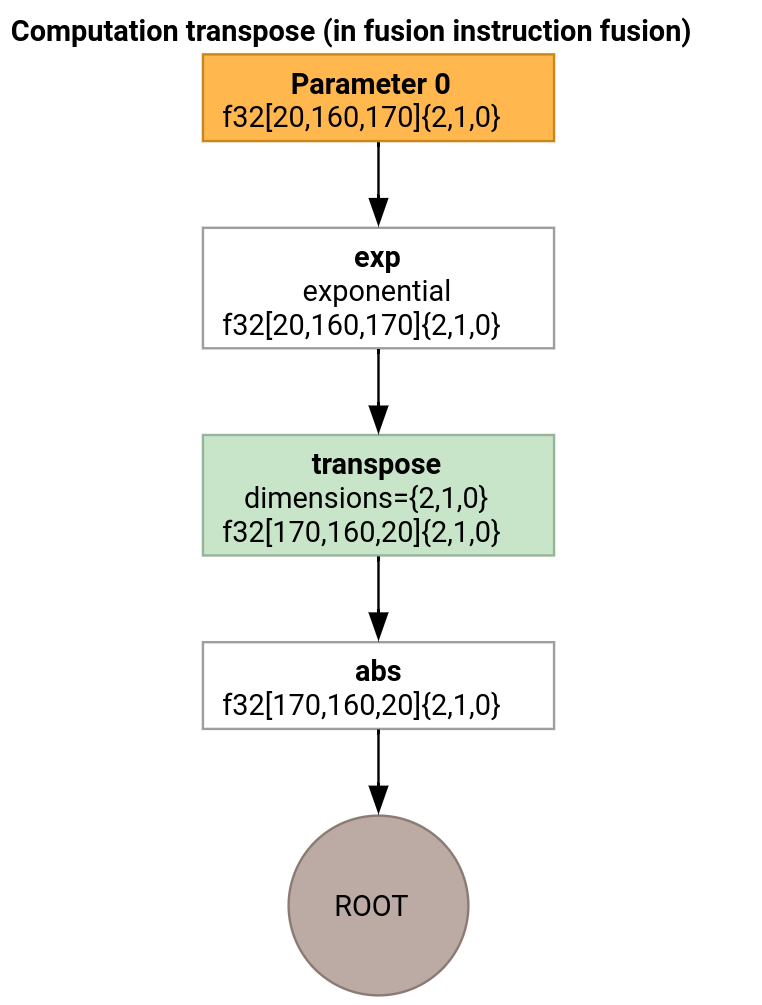
ट्रांसपोज़ एमिटर और लूप एमिटर में सिर्फ़ इस बात का अंतर होता है कि एंट्री फ़ंक्शन कैसे जनरेट होता है.
func.func @transpose(%arg0: tensor<20x160x170xf32>, %arg1: tensor<170x160x20xf32>) -> tensor<170x160x20xf32> {
  %thread_id_x = gpu.thread_id  x {xla.range = [0 : index, 127 : index]}
  %block_id_x = gpu.block_id  x {xla.range = [0 : index, 959 : index]}

  %shmem = xla_gpu.allocate_shared : tensor<32x1x33xf32>
  %xla_loop = xla_gpu.loop (%thread_id_x, %block_id_x)[%i, %j]
      -> (%input_dim0, %input_dim1, %input_dim2, %shmem_dim0, %shmem_dim1, %shmem_dim2)
      in #map iter_args(%iter = %shmem) -> (tensor<32x1x33xf32>) {
    %extracted = tensor.extract %arg0[%input_dim0, %input_dim1, %input_dim2] : tensor<20x160x170xf32>
    %0 = math.exp %extracted : f32
    %inserted = tensor.insert %0 into %iter[%shmem_dim0, %shmem_dim1, %shmem_dim2] : tensor<32x1x33xf32>
    xla_gpu.yield %inserted : tensor<32x1x33xf32>
  }

  %synced_tensor = xla_gpu.sync_threads %xla_loop : tensor<32x1x33xf32>

  %xla_loop_0 = xla_gpu.loop (%thread_id_x %block_id_x)[%i, %j] -> (%dim0, %dim1, %dim2)
      in #map1 iter_args(%iter = %arg1) -> (tensor<170x160x20xf32>) {
    // indexing computations
    %extracted = tensor.extract %synced_tensor[%0, %c0, %1] : tensor<32x1x33xf32>
    %2 = math.absf %extracted : f32
    %inserted = tensor.insert %2 into %iter[%3, %4, %1] : tensor<170x160x20xf32>
    xla_gpu.yield %inserted : tensor<170x160x20xf32>
  }
  return %xla_loop_0 : tensor<170x160x20xf32>
}
इस मामले में, हम दो xla_gpu.loop ऑप्स जनरेट करते हैं. पहली प्रोसेस, इनपुट से एक साथ कई वैल्यू पढ़ती है और नतीजे को शेयर की गई मेमोरी में लिखती है.
शेयर की गई मेमोरी का टेंसर, xla_gpu.allocate_shared ऑप का इस्तेमाल करके बनाया जाता है.
xla_gpu.sync_threads का इस्तेमाल करके थ्रेड सिंक होने के बाद, दूसरा xla_gpu.loop शेयर की गई मेमोरी टेंसर से एलिमेंट पढ़ता है और आउटपुट में कोएलस्ड राइट ऑपरेशन करता है.
समस्या को दोहराने वाला
कंपाइलेशन पाइपलाइन के हर पास के बाद आईआर देखने के लिए, run_hlo_module को --xla_dump_emitter_re=mlir-fusion फ़्लैग के साथ लॉन्च किया जा सकता है.
run_hlo_module --platform=CUDA --xla_disable_all_hlo_passes --reference_platform="" /tmp/gelu.hlo --xla_dump_emitter_re=mlir-fusion --xla_dump_to=<some_directory>
where /tmp/gelu.hlo contains
HloModule m:

gelu {
  %param = bf16[6,512,4096] parameter(0)
  %constant_0 = bf16[] constant(0.5)
  %bcast_0 = bf16[6,512,4096] broadcast(bf16[] %constant_0), dimensions={}
  %constant_1 = bf16[] constant(1)
  %bcast_1 = bf16[6,512,4096] broadcast(bf16[] %constant_1), dimensions={}
  %constant_2 = bf16[] constant(0.79785)
  %bcast_2 = bf16[6,512,4096] broadcast(bf16[] %constant_2), dimensions={}
  %constant_3 = bf16[] constant(0.044708)
  %bcast_3 = bf16[6,512,4096] broadcast(bf16[] %constant_3), dimensions={}
  %square = bf16[6,512,4096] multiply(bf16[6,512,4096] %param, bf16[6,512,4096] %param)
  %cube = bf16[6,512,4096] multiply(bf16[6,512,4096] %square, bf16[6,512,4096] %param)
  %multiply_3 = bf16[6,512,4096] multiply(bf16[6,512,4096] %cube, bf16[6,512,4096] %bcast_3)
  %add_1 = bf16[6,512,4096] add(bf16[6,512,4096] %param, bf16[6,512,4096] %multiply_3)
  %multiply_2 = bf16[6,512,4096] multiply(bf16[6,512,4096] %add_1, bf16[6,512,4096] %bcast_2)
  %tanh_0 = bf16[6,512,4096] tanh(bf16[6,512,4096] %multiply_2)
  %add_0 = bf16[6,512,4096] add(bf16[6,512,4096] %tanh_0, bf16[6,512,4096] %bcast_1)
  %multiply_1 = bf16[6,512,4096] multiply(bf16[6,512,4096] %add_0, bf16[6,512,4096] %bcast_0)
  ROOT %multiply_0 = bf16[6,512,4096] multiply(bf16[6,512,4096] %param, bf16[6,512,4096] %multiply_1)
}

ENTRY main {
  %param = bf16[6,512,4096] parameter(0)
  ROOT fusion = bf16[6,512,4096] fusion(%param), kind=kLoop, calls=gelu
}
कोड के लिंक
- कंपाइलेशन पाइपलाइन: emitter_base.h
- ऑप्टिमाइज़ेशन और कन्वर्ज़न पास: backends/gpu/codegen/emitters/transforms
- पार्टिशन लॉजिक: computation_partitioner.h
- हीरो-आधारित एमिटर: backends/gpu/codegen/emitters
- XLA:GPU ops: xla_gpu_ops.td
- सही होने और लिट टेस्ट: backends/gpu/codegen/emitters/tests