

วิธีสร้างโค้ดสำหรับ HLO ใน XLA:GPU มี 3 วิธี
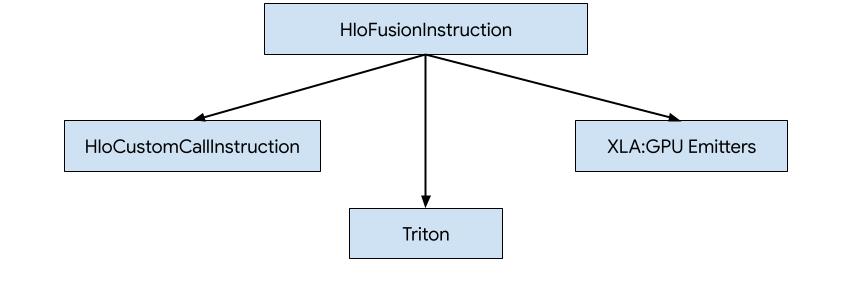
- แทนที่ HLO ด้วยการเรียกที่กำหนดเองไปยังไลบรารีภายนอก เช่น NVidia cuBLAS, cuDNN
- การแบ่ง HLO เป็นระดับบล็อก แล้วใช้ OpenAI Triton
- การใช้ XLA Emitters เพื่อลด HLO เป็น LLVM IR อย่างค่อยเป็นค่อยไป
เอกสารนี้มุ่งเน้นที่ XLA:GPU Emitters
การสร้างโค้ดตามฮีโร่
XLA:GPU มีเครื่องปล่อยสัญญาณ 7 ประเภท Emitter แต่ละประเภทจะสอดคล้องกับ "ฮีโร่" ของการผสาน นั่นคือ Op ที่สำคัญที่สุดในการคำนวณที่ผสานรวมซึ่งกำหนด การสร้างโค้ดสำหรับการผสานรวมทั้งหมด
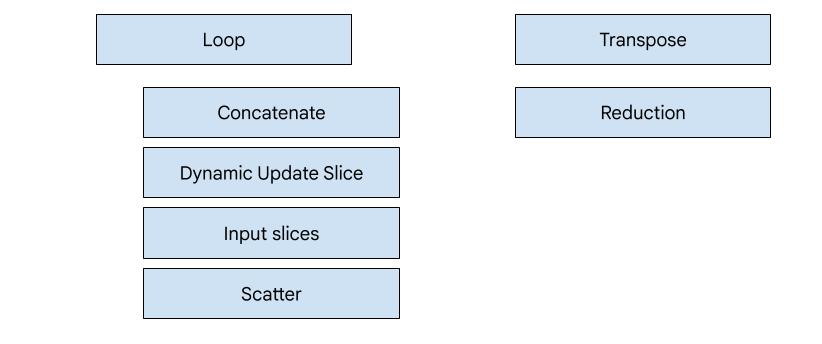
ตัวอย่างเช่น ระบบจะเลือกตัวปล่อยสัญญาณการย้ายตำแหน่งหากมี HloTransposeInstruction ภายในฟิวชันที่ต้องใช้หน่วยความจำที่ใช้ร่วมกันเพื่อปรับปรุงรูปแบบการอ่านและการเขียนหน่วยความจำ เครื่องมือปล่อยการลดจะสร้างการลดโดยใช้การสับเปลี่ยนและการแชร์หน่วยความจำ โดยค่าเริ่มต้น ตัวปล่อยลูปจะเป็นตัวปล่อย
หากการรวมไม่มีฮีโร่ที่เรามีอีมิตเตอร์พิเศษ
ระบบจะใช้อีมิตเตอร์ลูป
ภาพรวมระดับสูง
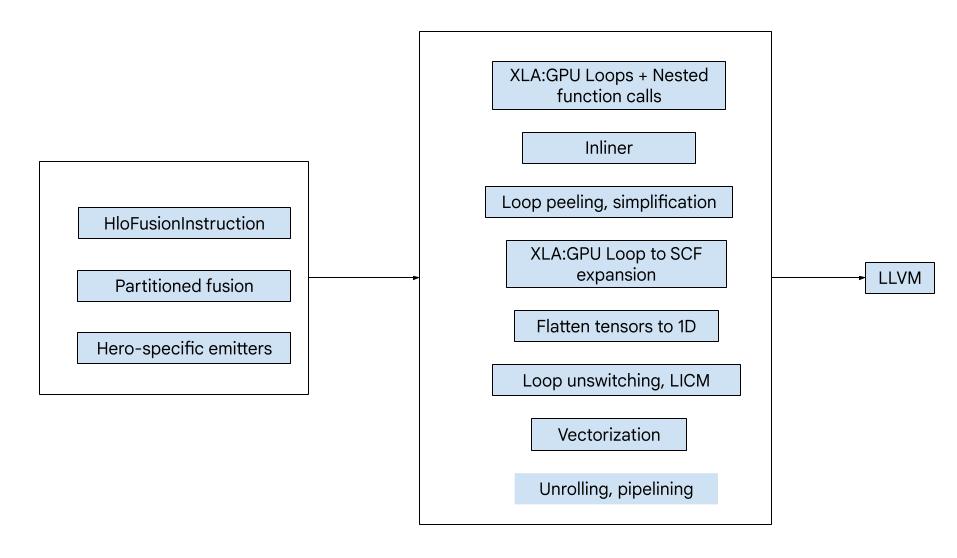
โค้ดประกอบด้วยองค์ประกอบพื้นฐานขนาดใหญ่ต่อไปนี้
- ตัวแบ่งพาร์ติชันการคำนวณ - การแยกการคำนวณฟิวชัน HLO ออกเป็นฟังก์ชัน
- Emitter - การแปลงฟิวชัน HLO ที่แบ่งพาร์ติชันเป็น MLIR (
xla_gpu,tensor,arith,math,scfdialects) - ไปป์ไลน์การคอมไพล์ - เพิ่มประสิทธิภาพและลด IR เป็น LLVM
การแบ่งพาร์ติชัน
คำสั่ง HLO ที่ไม่ใช่ระดับองค์ประกอบอาจไม่สามารถปล่อยออกมาพร้อมกันได้เสมอ พิจารณากราฟ HLO ต่อไปนี้
     param
       |
      log
      |  \
      |  transpose
      |  /
      add
หากเราส่งค่านี้ในฟังก์ชันเดียว ระบบจะเข้าถึง log ที่ดัชนี 2 รายการ
ที่แตกต่างกันสำหรับแต่ละองค์ประกอบของ add โดยเครื่องส่งสัญญาณรุ่นเก่าจะแก้ปัญหานี้ด้วยการสร้าง log 2 ครั้ง สำหรับกราฟนี้ ปัญหานี้จะไม่เกิดขึ้น
แต่เมื่อมีการแยกหลายครั้ง ขนาดโค้ดจะเพิ่มขึ้น
แบบทวีคูณ
ในที่นี้ เราแก้ปัญหานี้ด้วยการแบ่งกราฟออกเป็นส่วนๆ ที่สามารถ ส่งออกเป็นฟังก์ชันเดียวได้อย่างปลอดภัย เกณฑ์มีดังต่อไปนี้
- คำสั่งที่มีผู้ใช้เพียงรายเดียวจะส่งพร้อมกับผู้ใช้ได้อย่างปลอดภัย
- คำสั่งที่มีผู้ใช้หลายคนจะปลอดภัยที่จะปล่อยพร้อมกับผู้ใช้เหล่านั้น หากผู้ใช้ทุกคนเข้าถึงผ่านดัชนีเดียวกัน
ในตัวอย่างข้างต้น add และ tranpose เข้าถึงดัชนีที่แตกต่างกันของ
log จึงไม่ปลอดภัยที่จะส่งพร้อมกับดัชนีเหล่านั้น
ดังนั้น กราฟจึงแบ่งออกเป็น 3 ฟังก์ชัน (แต่ละฟังก์ชันมีคำสั่งเพียงคำสั่งเดียว)
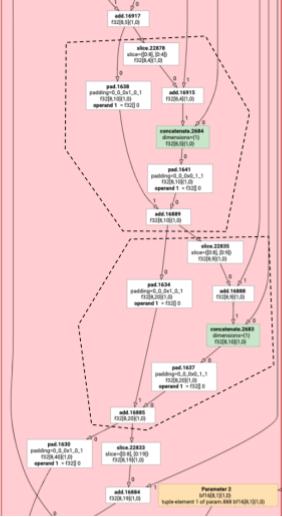
กรณีเดียวกันนี้จะมีผลกับตัวอย่างต่อไปนี้ที่มี slice และ pad ของ add
การปล่อยอนุภาค
การปล่อยองค์ประกอบจะสร้างลูปและตัวดำเนินการทางคณิตศาสตร์/เลขคณิตสำหรับ HloInstructions โดยส่วนใหญ่แล้ว การดำเนินการนี้ไม่ซับซ้อน แต่ก็มีบางสิ่งที่น่าสนใจ
เกิดขึ้นที่นี่
การเปลี่ยนรูปแบบการจัดทำดัชนี
คำสั่งบางอย่าง (transpose, broadcast, reshape, slice, reverse และอีก 2-3 คำสั่ง) เป็นการแปลงดัชนีโดยเฉพาะ กล่าวคือ ในการสร้างองค์ประกอบของผลลัพธ์ เราต้องสร้างองค์ประกอบอื่นๆ ของอินพุต ในกรณีนี้ เราสามารถ
นำ indexing_analysis ของ XLA มาใช้ซ้ำได้ ซึ่งมี
ฟังก์ชันในการสร้างการแมปเอาต์พุตกับอินพุตสำหรับคำสั่ง
เช่น สำหรับ transpose จาก [20,40] ไปยัง [40,20] จะสร้างแผนที่การจัดทำดัชนีต่อไปนี้ (นิพจน์เชิงเส้น 1 รายการต่อมิติข้อมูลอินพุต d0 และ d1 คือมิติข้อมูลเอาต์พุต)
  (d0, d1) -> d1
  (d0, d1) -> d0
ดังนั้นสำหรับวิธีการแปลงดัชนีอย่างแท้จริงเหล่านี้ เราเพียงแค่รับแผนที่ ใช้กับดัชนีเอาต์พุต และสร้างอินพุตที่ดัชนีผลลัพธ์
ในทำนองเดียวกัน pad op จะใช้แผนที่การจัดทำดัชนีและข้อจำกัดสำหรับการติดตั้งใช้งานส่วนใหญ่
pad ยังเป็นการแปลงการจัดทำดัชนีที่มีการตรวจสอบเพิ่มเติม
เพื่อดูว่าเราจะแสดงผลองค์ประกอบของอินพุตหรือค่าการเพิ่มพื้นที่
ทูเพิล
เราไม่รองรับ tuple ภายใน นอกจากนี้ เรายังไม่รองรับเอาต์พุตของทูเพิลที่ซ้อนกัน
กราฟ XLA ทั้งหมดที่ใช้ฟีเจอร์เหล่านี้สามารถแปลงเป็นกราฟที่ไม่ได้ใช้ได้
รวบรวม
เรารองรับเฉพาะการรวบรวมข้อมูล Canonical ตามที่ gather_simplifier สร้างขึ้นเท่านั้น
ฟังก์ชันกราฟย่อย
สำหรับกราฟย่อยของการคำนวณที่มีพารามิเตอร์ %p0 ถึง %p_n และกราฟย่อย
รูทที่มีมิติข้อมูล r และประเภทองค์ประกอบ (e0 ถึง e_m) เราจะใช้
ลายเซ็นฟังก์ชัน MLIR ต่อไปนี้
(%p0: tensor<...>, %p1: tensor<...>, ..., %pn: tensor<...>,
 %i0: index, %i1: index, ..., %i_r-1: index) -> (e0, ..., e_m)
กล่าวคือ เรามีอินพุต Tensor 1 รายการต่อพารามิเตอร์การคำนวณ 1 รายการ อินพุตดัชนี 1 รายการต่อ มิติของเอาต์พุต และผลลัพธ์ 1 รายการต่อเอาต์พุต
หากต้องการปล่อยฟังก์ชัน เราเพียงแค่ใช้ตัวปล่อยองค์ประกอบด้านบน และปล่อยตัวถูกดำเนินการแบบเรียกซ้ำ
จนกว่าจะถึงขอบของกราฟย่อย จากนั้นเราจะ
tensor.extract สำหรับพารามิเตอร์ หรือ func.call สำหรับกราฟย่อยอื่นๆ
ฟังก์ชันรายการ
เครื่องมือปล่อยแต่ละประเภทจะแตกต่างกันในวิธีสร้างฟังก์ชันรายการ ซึ่งก็คือ ฟังก์ชันสำหรับฮีโร่ ฟังก์ชันรายการจะแตกต่างจากฟังก์ชันด้านบน เนื่องจากไม่มีดัชนีเป็นอินพุต (มีเพียงรหัสเธรดและบล็อก) และต้อง เขียนเอาต์พุตที่ใดที่หนึ่ง สำหรับเครื่องปล่อยลูป การดำเนินการนี้ค่อนข้างตรงไปตรงมา แต่เครื่องปล่อยการย้ายตำแหน่งและการลดมีตรรกะการเขียนที่ซับซ้อน
ลายเซ็นของการคำนวณรายการคือ
(%p0: tensor<...>, ..., %pn: tensor<...>,
 %r0: tensor<...>, ..., %rn: tensor<...>) -> (tensor<...>, ..., tensor<...>)
โดยที่ %pn คือพารามิเตอร์ของการคำนวณ และ
%rn คือผลลัพธ์ของการคำนวณ การคำนวณรายการจะใช้tensor.inserts เป็นเทนเซอร์ อัปเดตลงในเทนเซอร์ แล้วส่งกลับ
ไม่อนุญาตให้ใช้เอาต์พุตเทนเซอร์เพื่อวัตถุประสงค์อื่น
ไปป์ไลน์การรวบรวม
ตัวปล่อยอนุภาคแบบวนซ้ำ
ดู loop.h
มาศึกษาการส่งผ่านที่สำคัญที่สุดของไปป์ไลน์การคอมไพล์ MLIR โดยใช้ HLO สำหรับฟังก์ชัน GELU กัน
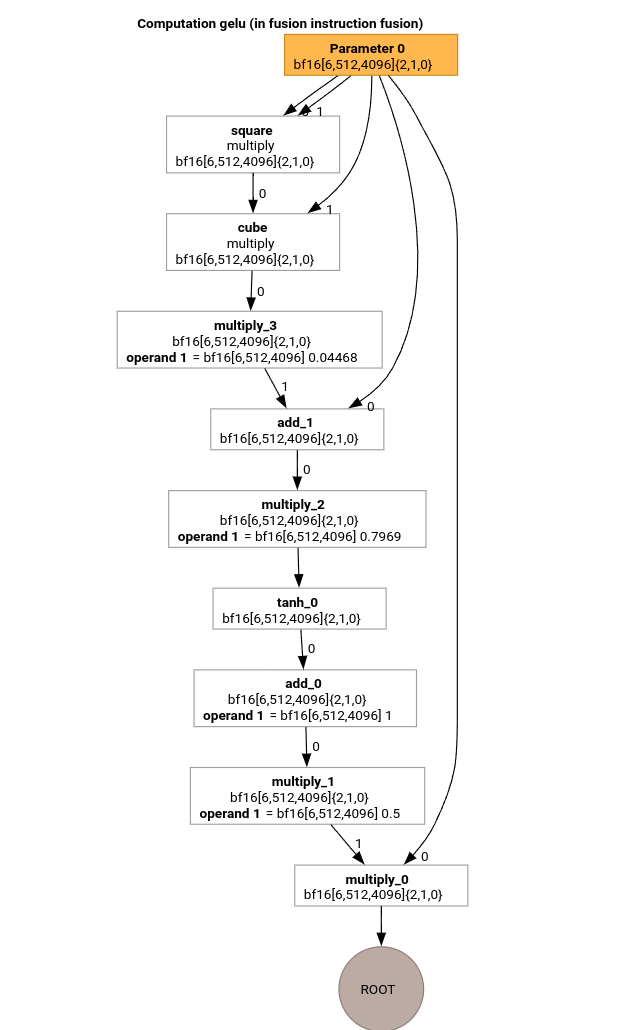
การคำนวณ HLO นี้มีเฉพาะการดำเนินการแบบทีละองค์ประกอบ ค่าคงที่ และการออกอากาศ โดยจะ ปล่อยออกมาโดยใช้เครื่องปล่อยสัญญาณแบบวนซ้ำ
การแปลง MLIR
หลังจากแปลงเป็น MLIR เราจะได้รับ xla_gpu.loop ซึ่งขึ้นอยู่กับ
%thread_id_x และ %block_id_x และกำหนดลูปที่ข้ามผ่านองค์ประกอบทั้งหมดของเอาต์พุตเชิงเส้นเพื่อให้มั่นใจว่าการเขียนจะรวมกัน
ในการวนซ้ำแต่ละครั้งของลูปนี้ เราจะเรียก
   %pure_call = xla_gpu.pure_call @gelu(%input, %dim0, %dim1, %dim2)
      : (tensor<6x512x4096xbf16>, index, index, index) -> bf16
เพื่อคำนวณองค์ประกอบของการดำเนินการรูท โปรดทราบว่าเรามีฟังก์ชันที่ระบุไว้เพียงฟังก์ชันเดียวสำหรับ @gelu เนื่องจากตัวแบ่งพาร์ติชันไม่พบเทนเซอร์ที่มีรูปแบบการเข้าถึงที่แตกต่างกัน 2 รูปแบบขึ้นไป
#map = #xla_gpu.indexing_map<"(th_x, bl_x)[vector_index] -> ("
 "bl_x floordiv 4096, (bl_x floordiv 8) mod 512, (bl_x mod 8) * 512 + th_x * 4 + vector_index),"
 "domain: th_x in [0, 127], bl_x in [0, 24575], vector_index in [0, 3]">

func.func @main(%input: tensor<6x512x4096xbf16> , %output: tensor<6x512x4096xbf16>)
   -> tensor<6x512x4096xbf16> {
 %thread_id_x = gpu.thread_id  x {xla.range = [0 : index, 127 : index]}
 %block_id_x = gpu.block_id  x {xla.range = [0 : index, 24575 : index]}

 %xla_loop = xla_gpu.loop (%thread_id_x, %block_id_x)[%vector_index] -> (%dim0, %dim1, %dim2)
     in #map iter_args(%iter = %output) -> (tensor<6x512x4096xbf16>) {
   %pure_call = xla_gpu.pure_call @gelu(%input, %dim0, %dim1, %dim2)
      : (tensor<6x512x4096xbf16>, index, index, index) -> bf16
   %inserted = tensor.insert %pure_call into %iter[%dim0, %dim1, %dim2] : tensor<6x512x4096xbf16>
   xla_gpu.yield %inserted : tensor<6x512x4096xbf16>
 }
 return %xla_loop : tensor<6x512x4096xbf16>
}

func.func private @gelu(%arg0: tensor<6x512x4096xbf16>, %i: index, %j: index, %k: index) -> bf16 {
  %cst = arith.constant 5.000000e-01 : bf16
  %cst_0 = arith.constant 1.000000e+00 : bf16
  %cst_1 = arith.constant 7.968750e-01 : bf16
  %cst_2 = arith.constant 4.467770e-02 : bf16
  %extracted = tensor.extract %arg0[%i, %j, %k] : tensor<6x512x4096xbf16>
  %0 = arith.mulf %extracted, %extracted : bf16
  %1 = arith.mulf %0, %extracted : bf16
  %2 = arith.mulf %1, %cst_2 : bf16
  %3 = arith.addf %extracted, %2 : bf16
  %4 = arith.mulf %3, %cst_1 : bf16
  %5 = math.tanh %4 : bf16
  %6 = arith.addf %5, %cst_0 : bf16
  %7 = arith.mulf %6, %cst : bf16
  %8 = arith.mulf %extracted, %7 : bf16
  return %8 : bf16
}
อินไลน์
หลังจากฝัง @gelu แล้ว เราจะได้ฟังก์ชัน @main เดียว อาจมีการเรียกฟังก์ชันเดียวกัน 2 ครั้งขึ้นไป ในกรณีนี้ เราจะไม่แทรก ดูรายละเอียดเพิ่มเติมเกี่ยวกับกฎการแทรกอินไลน์ได้ใน
xla_gpu_dialect.cc
func.func @main(%arg0: tensor<6x512x4096xbf16>, %arg1: tensor<6x512x4096xbf16>) -> tensor<6x512x4096xbf16> {
 ...
  %thread_id_x = gpu.thread_id  x {xla.range = [0 : index, 127 : index]}
  %block_id_x = gpu.block_id  x {xla.range = [0 : index, 24575 : index]}

  %xla_loop = xla_gpu.loop (%thread_id_x, %block_id_x)[%vector_index] -> (%dim0, %dim1, %dim2)
      in #map iter_args(%iter = %output) -> (tensor<6x512x4096xbf16>) {
    %extracted = tensor.extract %input[%dim0, %dim1, %dim2] : tensor<6x512x4096xbf16>
    %0 = arith.mulf %extracted, %extracted : bf16
    %1 = arith.mulf %0, %extracted : bf16
    %2 = arith.mulf %1, %cst : bf16
    %3 = arith.addf %extracted, %2 : bf16
    %4 = arith.mulf %3, %cst_0 : bf16
    %5 = math.tanh %4 : bf16
    %6 = arith.addf %5, %cst_1 : bf16
    %7 = arith.mulf %6, %cst_2 : bf16
    %8 = arith.mulf %extracted, %7 : bf16
    %inserted = tensor.insert %8 into %iter[%dim0, %dim1, %dim2] : tensor<6x512x4096xbf16>
    xla_gpu.yield %inserted : tensor<6x512x4096xbf16>
  }
  return %xla_loop : tensor<6x512x4096xbf16>
}
Conversion xla_gpu ถึง scf
xla_gpu.loop แสดงถึงการซ้อนลูปที่มีการตรวจสอบขอบเขตอยู่ภายใน หากตัวแปร loop
inductions อยู่นอกขอบเขตของโดเมนแผนที่การจัดทำดัชนี ระบบจะข้ามการวนซ้ำนี้
ซึ่งหมายความว่าลูปจะแปลงเป็น Op scf.for ที่ซ้อนกันอย่างน้อย 1 รายการโดยมี scf.if อยู่ภายใน
%xla_loop = scf.for %vector_index = %c0 to %c4 step %c1 iter_args(%iter = %output) -> (tensor<6x512x4096xbf16>) {
   %2 = arith.cmpi sge, %thread_id_x, %c0 : index
   %3 = arith.cmpi sle, %thread_id_x, %c127 : index
   %4 = arith.andi %2, %3 : i1
   %5 = arith.cmpi sge, %block_id_x, %c0 : index
   %6 = arith.cmpi sle, %block_id_x, %c24575 : index
   %7 = arith.andi %5, %6 : i1
   %inbounds = arith.andi %4, %7 : i1
   %9 = scf.if %inbounds -> (tensor<6x512x4096xbf16>) {
     %dim0 = xla_gpu.apply_indexing #map(%thread_id_x,  %block_id_x)[%vector_index]
     %dim1 = xla_gpu.apply_indexing #map1(%thread_id_x, %block_id_x)[%vector_index]
     %dim2 = xla_gpu.apply_indexing #map2(%thread_id_x, %block_id_x)[%vector_index]
     %extracted = tensor.extract %input[%dim0, %dim1, %dim2] : tensor<6x512x4096xbf16>
     // ... more arithmetic operations
     %29 = arith.mulf %extracted, %28 : bf16
     %inserted = tensor.insert %29 into %iter[%dim0, %dim1, %dim2] : tensor<6x512x4096xbf16>
     scf.yield %inserted : tensor<6x512x4096xbf16>
   } else {
     scf.yield %iter : tensor<6x512x4096xbf16>
   }
   scf.yield %9 : tensor<6x512x4096xbf16>
 }
Flatten tensors
เทนเซอร์ N มิติจะฉายไปยัง 1 มิติ ซึ่งจะช่วยลดความซับซ้อนของการแปลงเป็นเวกเตอร์และ การลดระดับเป็น LLVM เนื่องจากตอนนี้การเข้าถึงเทนเซอร์ทุกครั้งจะสอดคล้องกับวิธีจัดแนวข้อมูล ในหน่วยความจำ
#map = #xla_gpu.indexing_map<"(th_x, bl_x, vector_index) -> (th_x * 4 + bl_x * 512 + vector_index),"
 "domain: th_x in [0, 127], bl_x in [0, 24575], vector_index in [0, 3]">

func.func @main(%input: tensor<12582912xbf16>, %output: tensor<12582912xbf16>) -> tensor<12582912xbf16> {
 %xla_loop = scf.for %vector_index = %c0 to %c4 step %c1 iter_args(%iter = %output) -> (tensor<12582912xbf16>) {
   %dim = xla_gpu.apply_indexing #map(%thread_id_x, %block_id_x, %vector_index)
   %extracted = tensor.extract %input[%dim] : tensor<12582912xbf16>
   %2 = arith.mulf %extracted, %extracted : bf16
   %3 = arith.mulf %2, %extracted : bf16
   %4 = arith.mulf %3, %cst_2 : bf16
   %5 = arith.addf %extracted, %4 : bf16
   %6 = arith.mulf %5, %cst_1 : bf16
   %7 = math.tanh %6 : bf16
   %8 = arith.addf %7, %cst_0 : bf16
   %9 = arith.mulf %8, %cst : bf16
   %10 = arith.mulf %extracted, %9 : bf16
   %inserted = tensor.insert %10 into %iter[%dim] : tensor<12582912xbf16>
   scf.yield %inserted : tensor<12582912xbf16>
 }
 return %xla_loop : tensor<12582912xbf16>
}
การแปลงเป็นเวกเตอร์
การส่งผ่านจะวิเคราะห์ดัชนีใน Op tensor.extract และ tensor.insert
และหากสร้างโดย xla_gpu.apply_indexing ที่เข้าถึงองค์ประกอบ
อย่างต่อเนื่องเมื่อเทียบกับ %vector_index และการเข้าถึงสอดคล้องกัน ระบบจะแปลง tensor.extract เป็น vector.transfer_read และยกออกนอก
ลูป
ในกรณีนี้ มีการใช้แผนที่การจัดทำดัชนี
(th_x, bl_x, vector_index) -> (th_x * 4 + bl_x * 512 + vector_index)เพื่อ
คำนวณองค์ประกอบที่จะดึงและแทรกในลูป scf.for จาก 0 ถึง 4
ดังนั้นจึงสามารถแปลงทั้ง tensor.extract และ tensor.insert เป็นเวกเตอร์ได้
func.func @main(%input: tensor<12582912xbf16>, %output: tensor<12582912xbf16>) -> tensor<12582912xbf16> {
 %vector_0 = arith.constant dense<0.000000e+00> : vector<4xbf16>
 %0 = xla_gpu.apply_indexing #map(%thread_id_x, %block_id_x, %c0)
 %2 = vector.transfer_read %input[%0], %cst {in_bounds = [true]} : tensor<12582912xbf16>, vector<4xbf16>
 %xla_loop:2 = scf.for %vector_index = %c0 to %c4 step %c1
     iter_args(%iter = %output, %iter_vector = %vector_0) -> (tensor<12582912xbf16>, vector<4xbf16>) {
   %5 = vector.extract %2[%vector_index] : bf16 from vector<4xbf16>
   %6 = arith.mulf %5, %5 : bf16
   %7 = arith.mulf %6, %5 : bf16
   %8 = arith.mulf %7, %cst_4 : bf16
   %9 = arith.addf %5, %8 : bf16
   %10 = arith.mulf %9, %cst_3 : bf16
   %11 = math.tanh %10 : bf16
   %12 = arith.addf %11, %cst_2 : bf16
   %13 = arith.mulf %12, %cst_1 : bf16
   %14 = arith.mulf %5, %13 : bf16
   %15 = vector.insert %14, %iter_vector [%vector_index] : bf16 into vector<4xbf16>
   scf.yield %iter, %15 : tensor<12582912xbf16>, vector<4xbf16>
 }
 %4 = vector.transfer_write %xla_loop#1, %output[%0] {in_bounds = [true]}
     : vector<4xbf16>, tensor<12582912xbf16>
 return %4 : tensor<12582912xbf16>
}
การยกเลิกการวนซ้ำ
การคลายลูปจะค้นหาลูป scf.for ที่คลายได้ ในกรณีนี้ ลูปที่วนซ้ำองค์ประกอบของเวกเตอร์จะหายไป
func.func @main(%input: tensor<12582912xbf16>, %arg1: tensor<12582912xbf16>) -> tensor<12582912xbf16> {

  %cst_0 = arith.constant dense<0.000000e+00> : vector<4xbf16>
  %dim = xla_gpu.apply_indexing #map(%thread_id_x, %block_id_x, %c0)
  %2 = vector.transfer_read %input[%dim], %cst {in_bounds = [true]} : tensor<12582912xbf16>, vector<4xbf16>
  %3 = vector.extract %2[%c0] : bf16 from vector<4xbf16>
  ...
  %13 = vector.insert %12, %cst_0 [%c0] : bf16 into vector<4xbf16>
  %14 = vector.extract %2[%c1] : bf16 from vector<4xbf16>
  ...
  %24 = vector.insert %23, %13 [%c1] : bf16 into vector<4xbf16>
  %25 = vector.extract %2[%c2] : bf16 from vector<4xbf16>
  ...
  %35 = vector.insert %34, %24 [%c2] : bf16 into vector<4xbf16>
  %36 = vector.extract %2[%c3] : bf16 from vector<4xbf16>
  ...
  %46 = vector.insert %45, %35 [%c3] : bf16 into vector<4xbf16>
  %47 = vector.transfer_write %46, %arg1[%dim] {in_bounds = [true]} : vector<4xbf16>, tensor<12582912xbf16>
  return %47 : tensor<12582912xbf16>
}
การแปลงเป็น LLVM
เราใช้การลดระดับ LLVM มาตรฐานเป็นส่วนใหญ่ แต่ก็มีการส่งผ่านพิเศษอยู่บ้าง
เราไม่สามารถใช้การลด memref สำหรับเทนเซอร์ได้ เนื่องจากเราไม่ได้บัฟเฟอร์ IR และ ABI ของเราไม่สามารถใช้งานร่วมกับ ABI ของ memref ได้ แต่เรามี
การลดที่กำหนดเองจากเทนเซอร์ไปยัง LLVM โดยตรง
- การลดระดับเทนเซอร์จะดำเนินการใน lower_tensors.cc
tensor.extractจะลดลงเหลือllvm.load,tensor.insertเหลือllvm.storeอย่างเห็นได้ชัด - propagate_slice_indices และ merge_pointers_to_same_slice ร่วมกัน ใช้รายละเอียดการกำหนดบัฟเฟอร์และ ABI ของ XLA: หากเทนเซอร์ 2 รายการใช้ ส่วนของบัฟเฟอร์เดียวกัน ระบบจะส่งเทนเซอร์ดังกล่าวเพียงครั้งเดียว การส่งผ่านเหล่านี้จะขจัดข้อมูลที่ซ้ำกันของอาร์กิวเมนต์ฟังก์ชัน
llvm.func @__nv_tanhf(f32) -> f32
llvm.func @main(%arg0: !llvm.ptr, %arg1: !llvm.ptr) {
  %11 = nvvm.read.ptx.sreg.tid.x : i32
  %12 = nvvm.read.ptx.sreg.ctaid.x : i32
  %13 = llvm.mul %11, %1 : i32
  %14 = llvm.mul %12, %0 : i32
  %15 = llvm.add %13, %14 : i32
  %16 = llvm.getelementptr inbounds %arg0[%15] : (!llvm.ptr, i32) -> !llvm.ptr, bf16
  %17 = llvm.load %16 invariant : !llvm.ptr -> vector<4xbf16>
  %18 = llvm.extractelement %17[%2 : i32] : vector<4xbf16>
  %19 = llvm.fmul %18, %18  : bf16
  %20 = llvm.fmul %19, %18  : bf16
  %21 = llvm.fmul %20, %4  : bf16
  %22 = llvm.fadd %18, %21  : bf16
  %23 = llvm.fmul %22, %5  : bf16
  %24 = llvm.fpext %23 : bf16 to f32
  %25 = llvm.call @__nv_tanhf(%24) : (f32) -> f32
  %26 = llvm.fptrunc %25 : f32 to bf16
  %27 = llvm.fadd %26, %6  : bf16
  %28 = llvm.fmul %27, %7  : bf16
  %29 = llvm.fmul %18, %28  : bf16
  %30 = llvm.insertelement %29, %8[%2 : i32] : vector<4xbf16>
  ...
}
สลับตัวปล่อยอนุภาค
มาดูตัวอย่างที่ซับซ้อนขึ้นเล็กน้อยกัน
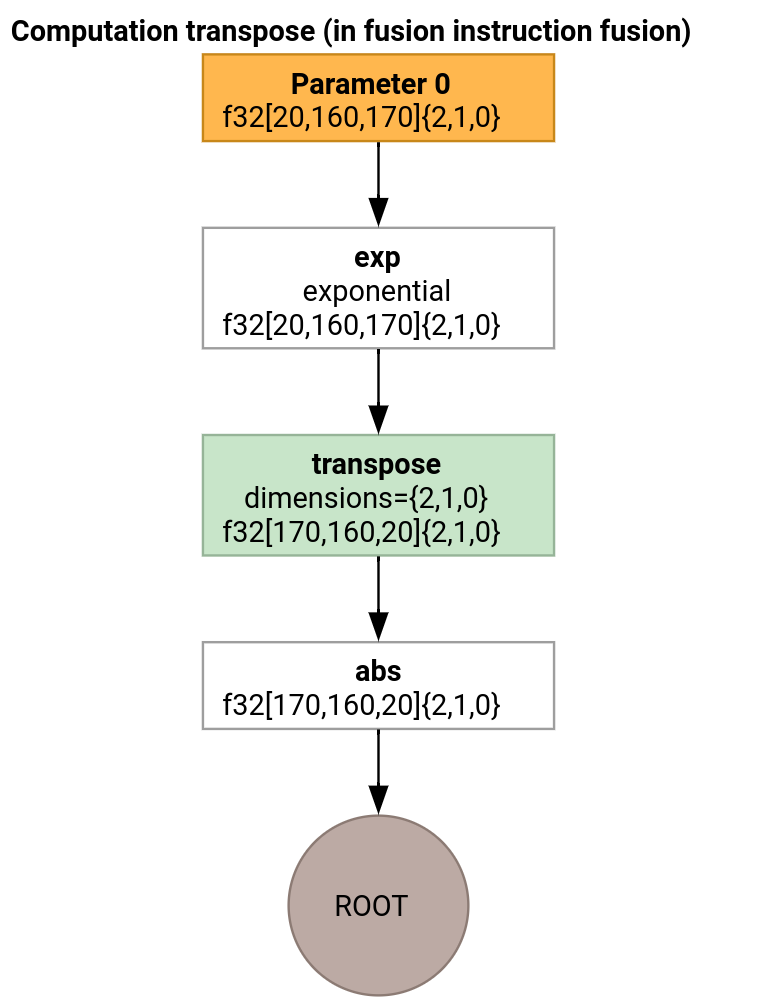
ตัวปล่อยการย้ายคีย์แตกต่างจากตัวปล่อยลูปเฉพาะในวิธีสร้างฟังก์ชันรายการ
func.func @transpose(%arg0: tensor<20x160x170xf32>, %arg1: tensor<170x160x20xf32>) -> tensor<170x160x20xf32> {
  %thread_id_x = gpu.thread_id  x {xla.range = [0 : index, 127 : index]}
  %block_id_x = gpu.block_id  x {xla.range = [0 : index, 959 : index]}

  %shmem = xla_gpu.allocate_shared : tensor<32x1x33xf32>
  %xla_loop = xla_gpu.loop (%thread_id_x, %block_id_x)[%i, %j]
      -> (%input_dim0, %input_dim1, %input_dim2, %shmem_dim0, %shmem_dim1, %shmem_dim2)
      in #map iter_args(%iter = %shmem) -> (tensor<32x1x33xf32>) {
    %extracted = tensor.extract %arg0[%input_dim0, %input_dim1, %input_dim2] : tensor<20x160x170xf32>
    %0 = math.exp %extracted : f32
    %inserted = tensor.insert %0 into %iter[%shmem_dim0, %shmem_dim1, %shmem_dim2] : tensor<32x1x33xf32>
    xla_gpu.yield %inserted : tensor<32x1x33xf32>
  }

  %synced_tensor = xla_gpu.sync_threads %xla_loop : tensor<32x1x33xf32>

  %xla_loop_0 = xla_gpu.loop (%thread_id_x %block_id_x)[%i, %j] -> (%dim0, %dim1, %dim2)
      in #map1 iter_args(%iter = %arg1) -> (tensor<170x160x20xf32>) {
    // indexing computations
    %extracted = tensor.extract %synced_tensor[%0, %c0, %1] : tensor<32x1x33xf32>
    %2 = math.absf %extracted : f32
    %inserted = tensor.insert %2 into %iter[%3, %4, %1] : tensor<170x160x20xf32>
    xla_gpu.yield %inserted : tensor<170x160x20xf32>
  }
  return %xla_loop_0 : tensor<170x160x20xf32>
}
ในกรณีนี้ เราจะสร้าง xla_gpu.loop 2 รายการ โดยตัวแรกจะดำเนินการ
อ่านแบบรวมจากอินพุตและเขียนผลลัพธ์ลงในหน่วยความจำที่ใช้ร่วมกัน
Tensor ของหน่วยความจำที่แชร์สร้างขึ้นโดยใช้ตัวดำเนินการ xla_gpu.allocate_shared
หลังจากซิงค์เธรดโดยใช้ xla_gpu.sync_threads แล้ว เธรดที่ 2
xla_gpu.loop จะอ่านองค์ประกอบจากเทนเซอร์หน่วยความจำที่ใช้ร่วมกันและดำเนินการ
เขียนแบบรวมไปยังเอาต์พุต
Reproducer
หากต้องการดู IR หลังจากทุกครั้งที่ผ่านไปป์ไลน์การคอมไพล์ คุณสามารถ
เปิดใช้ run_hlo_module ด้วยแฟล็ก --xla_dump_emitter_re=mlir-fusion
run_hlo_module --platform=CUDA --xla_disable_all_hlo_passes --reference_platform="" /tmp/gelu.hlo --xla_dump_emitter_re=mlir-fusion --xla_dump_to=<some_directory>
โดยที่ /tmp/gelu.hlo มี
HloModule m:

gelu {
  %param = bf16[6,512,4096] parameter(0)
  %constant_0 = bf16[] constant(0.5)
  %bcast_0 = bf16[6,512,4096] broadcast(bf16[] %constant_0), dimensions={}
  %constant_1 = bf16[] constant(1)
  %bcast_1 = bf16[6,512,4096] broadcast(bf16[] %constant_1), dimensions={}
  %constant_2 = bf16[] constant(0.79785)
  %bcast_2 = bf16[6,512,4096] broadcast(bf16[] %constant_2), dimensions={}
  %constant_3 = bf16[] constant(0.044708)
  %bcast_3 = bf16[6,512,4096] broadcast(bf16[] %constant_3), dimensions={}
  %square = bf16[6,512,4096] multiply(bf16[6,512,4096] %param, bf16[6,512,4096] %param)
  %cube = bf16[6,512,4096] multiply(bf16[6,512,4096] %square, bf16[6,512,4096] %param)
  %multiply_3 = bf16[6,512,4096] multiply(bf16[6,512,4096] %cube, bf16[6,512,4096] %bcast_3)
  %add_1 = bf16[6,512,4096] add(bf16[6,512,4096] %param, bf16[6,512,4096] %multiply_3)
  %multiply_2 = bf16[6,512,4096] multiply(bf16[6,512,4096] %add_1, bf16[6,512,4096] %bcast_2)
  %tanh_0 = bf16[6,512,4096] tanh(bf16[6,512,4096] %multiply_2)
  %add_0 = bf16[6,512,4096] add(bf16[6,512,4096] %tanh_0, bf16[6,512,4096] %bcast_1)
  %multiply_1 = bf16[6,512,4096] multiply(bf16[6,512,4096] %add_0, bf16[6,512,4096] %bcast_0)
  ROOT %multiply_0 = bf16[6,512,4096] multiply(bf16[6,512,4096] %param, bf16[6,512,4096] %multiply_1)
}

ENTRY main {
  %param = bf16[6,512,4096] parameter(0)
  ROOT fusion = bf16[6,512,4096] fusion(%param), kind=kLoop, calls=gelu
}
ลิงก์ไปยังโค้ด
- ไปป์ไลน์การคอมไพล์: emitter_base.h
- การเพิ่มประสิทธิภาพและการส่งผ่าน Conversion: backends/gpu/codegen/emitters/transforms
- ตรรกะการแบ่งพาร์ติชัน: computation_partitioner.h
- Emitter ที่อิงตามฮีโร่: backends/gpu/codegen/emitters
- XLA:GPU ops: xla_gpu_ops.td
- การทดสอบความถูกต้องและการทดสอบแบบไลท์: backends/gpu/codegen/emitters/tests