

XLA:GPU で HLO のコードを生成する方法は 3 つあります。
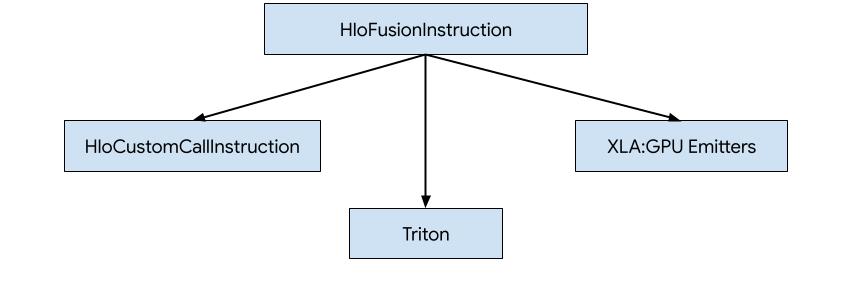
- HLO を外部ライブラリ(NVidia cuBLAS、cuDNN など)へのカスタム呼び出しに置き換えます。
- HLO をブロックレベルにタイル化し、OpenAI Triton を使用します。
- XLA エミッタを使用して、HLO を LLVM IR に段階的に変換します。
このドキュメントでは、XLA:GPU エミッタについて説明します。
ヒーローベースのコード生成
XLA:GPU には 7 種類のエミッタがあります。各エミッタタイプは、融合の「ヒーロー」、つまり融合された計算で最も重要な op に対応します。この op は、融合全体のコード生成を形成します。
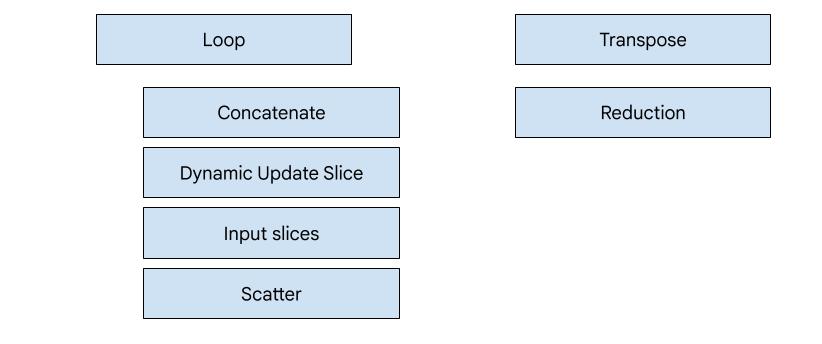
たとえば、メモリの読み取りと書き込みのパターンを改善するために共有メモリの使用が必要な HloTransposeInstruction が融合内に存在する場合、転置エミッタが選択されます。削減エミッタは、シャッフルと共有メモリを使用して削減を生成します。ループ エミッタはデフォルトのエミッタです。特別なエミッタがあるヒーローがフュージョンにいない場合は、ループ エミッタが使用されます。
概要
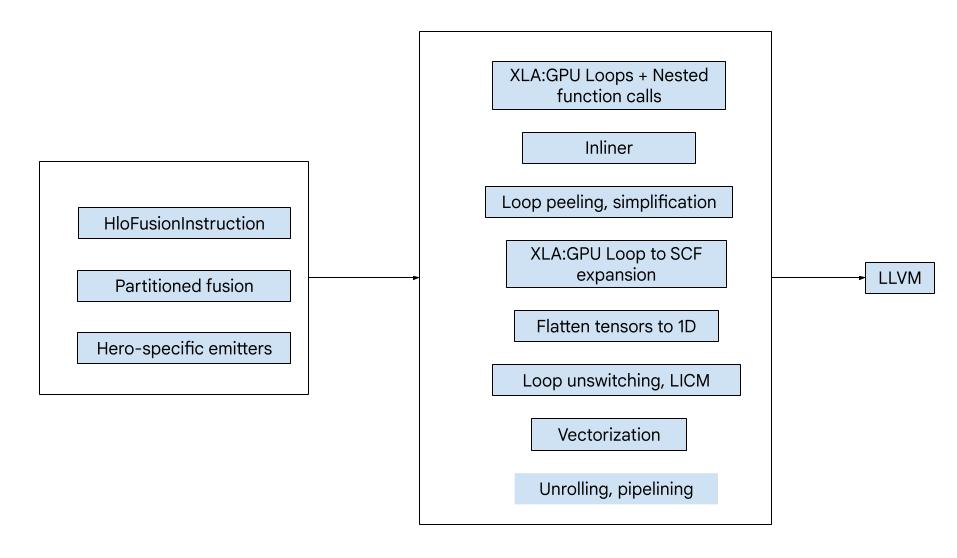
コードは次の大きな構成要素で構成されています。
- 計算パーティショナー - HLO 融合計算を関数に分割する
- エミッタ - パーティショニングされた HLO フュージョンを MLIR に変換(
xla_gpu、tensor、arith、math、scf言語) - コンパイル パイプライン - 最適化して IR を LLVM に変換
パーティショニング
computation_partitioner.h をご覧ください。
要素単位ではない HLO 命令は、常に一緒に発行できるとは限りません。次の HLO グラフを考えてみましょう。
     param
       |
      log
      |  \
      |  transpose
      |  /
      add
これを 1 つの関数で出力すると、log は add の各要素に対して 2 つの異なるインデックスでアクセスされます。以前のエミッタは、log を 2 回生成することでこの問題を解決します。この特定のグラフでは問題ありませんが、複数の分割がある場合、コードサイズは指数関数的に増加します。
ここでは、グラフを 1 つの関数として安全に発行できる部分に分割することで、この問題を解決します。条件は次のとおりです。
- ユーザーが 1 人しかいない命令は、ユーザーとともに安全に発行できます。
- 複数のユーザーを持つ命令は、すべてのユーザーが同じインデックスを介してアクセスする場合、ユーザーとともに安全に発行できます。
上記の例では、add と tranpose が log の異なるインデックスにアクセスするため、これらと一緒に発行するのは安全ではありません。
したがって、グラフは 3 つの関数に分割されます(それぞれに 1 つの命令が含まれます)。
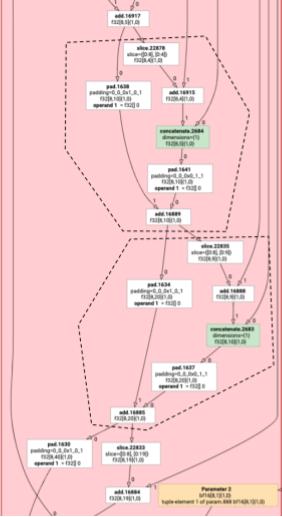
これは、add の slice と pad を含む次の例にも当てはまります。
元素の排出
elemental_hlo_to_mlir.h をご覧ください。
Elemental エミッションは、HloInstructions のループと算術演算を作成します。ほとんどの場合、これは簡単ですが、ここでは興味深いことがいくつか起こっています。
インデックス登録の変換
一部の命令(transpose、broadcast、reshape、slice、reverse など)は、インデックスの純粋な変換です。結果の要素を生成するには、入力の他の要素を生成する必要があります。これには、XLA の indexing_analysis を再利用できます。これには、命令の出力から入力へのマッピングを生成する関数があります。
たとえば、[20,40] から [40,20] までの transpose の場合、次のインデックス マップが生成されます(入力ディメンションごとに 1 つのアフィン式。d0 と d1 は出力ディメンション)。
  (d0, d1) -> d1
  (d0, d1) -> d0
したがって、これらの純粋なインデックス変換命令では、マップを取得して出力インデックスに適用し、結果のインデックスで入力を生成するだけで済みます。
同様に、pad op は実装のほとんどでインデックス マップと制約を使用します。pad は、入力の要素またはパディング値を返すかどうかを確認するチェックが追加されたインデックス変換でもあります。
タプル
内部 tuple はサポートされていません。ネストされたタプル出力もサポートされていません。これらの機能を使用するすべての XLA グラフは、これらの機能を使用しないグラフに変換できます。
収集
gather_simplifier によって生成された正規の収集のみがサポートされます。
サブグラフ関数
パラメータ %p0~%p_n を持つ計算のサブグラフと、r ディメンションと要素タイプ(e0~e_m)を持つサブグラフ ルートの場合、次の MLIR 関数シグネチャを使用します。
(%p0: tensor<...>, %p1: tensor<...>, ..., %pn: tensor<...>,
 %i0: index, %i1: index, ..., %i_r-1: index) -> (e0, ..., e_m)
つまり、計算パラメータごとに 1 つのテンソル入力、出力のディメンションごとに 1 つのインデックス入力、出力ごとに 1 つの結果があります。
関数を出力するには、上記の要素エミッタを使用し、サブグラフの端に到達するまでオペランドを再帰的に出力します。次に、パラメータの場合は tensor.extract を、他のサブグラフの場合は func.call を出力します。
エントリ関数
エミッタタイプごとに、エントリ関数(ヒーローの関数)の生成方法が異なります。エントリ関数は、入力としてインデックスを持たず(スレッド ID とブロック ID のみ)、実際に出力をどこかに書き込む必要があるため、上記の関数とは異なります。ループ エミッタの場合はかなり簡単ですが、転置エミッタと削減エミッタには複雑な書き込みロジックがあります。
エントリ計算のシグネチャは次のとおりです。
(%p0: tensor<...>, ..., %pn: tensor<...>,
 %r0: tensor<...>, ..., %rn: tensor<...>) -> (tensor<...>, ..., tensor<...>)
ここで、%pn は計算のパラメータ、%rn は計算の結果です。エントリの計算では、結果をテンソルとして取得し、tensor.insert がそれらを更新してから返します。出力テンソルの他の用途は認められません。
コンパイル パイプライン
ループ エミッター
loop.h をご覧ください。
GELU 関数の HLO を使用して、MLIR コンパイル パイプラインの最も重要なパスを学習しましょう。
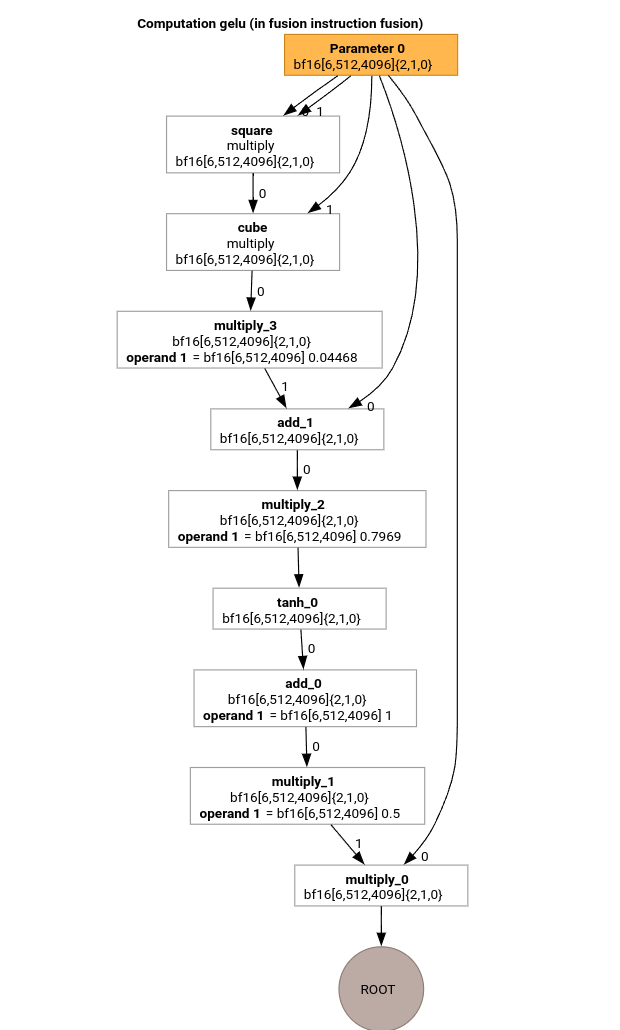
この HLO 計算には、要素ごとの演算、定数、ブロードキャストのみが含まれます。これはループ エミッタを使用して出力されます。
MLIR 変換
MLIR に変換すると、%thread_id_x と %block_id_x に依存する xla_gpu.loop が得られます。これは、出力のすべての要素を線形にトラバースして、結合された書き込みを保証するループを定義します。
このループのすべてのイテレーションで、
   %pure_call = xla_gpu.pure_call @gelu(%input, %dim0, %dim1, %dim2)
      : (tensor<6x512x4096xbf16>, index, index, index) -> bf16
ルート オペレーションの要素を計算します。パーティショナーが 2 つ以上のさまざまなアクセス パターンを持つテンソルを検出しなかったため、@gelu のアウトライン関数は 1 つだけです。
#map = #xla_gpu.indexing_map<"(th_x, bl_x)[vector_index] -> ("
 "bl_x floordiv 4096, (bl_x floordiv 8) mod 512, (bl_x mod 8) * 512 + th_x * 4 + vector_index),"
 "domain: th_x in [0, 127], bl_x in [0, 24575], vector_index in [0, 3]">

func.func @main(%input: tensor<6x512x4096xbf16> , %output: tensor<6x512x4096xbf16>)
   -> tensor<6x512x4096xbf16> {
 %thread_id_x = gpu.thread_id  x {xla.range = [0 : index, 127 : index]}
 %block_id_x = gpu.block_id  x {xla.range = [0 : index, 24575 : index]}

 %xla_loop = xla_gpu.loop (%thread_id_x, %block_id_x)[%vector_index] -> (%dim0, %dim1, %dim2)
     in #map iter_args(%iter = %output) -> (tensor<6x512x4096xbf16>) {
   %pure_call = xla_gpu.pure_call @gelu(%input, %dim0, %dim1, %dim2)
      : (tensor<6x512x4096xbf16>, index, index, index) -> bf16
   %inserted = tensor.insert %pure_call into %iter[%dim0, %dim1, %dim2] : tensor<6x512x4096xbf16>
   xla_gpu.yield %inserted : tensor<6x512x4096xbf16>
 }
 return %xla_loop : tensor<6x512x4096xbf16>
}

func.func private @gelu(%arg0: tensor<6x512x4096xbf16>, %i: index, %j: index, %k: index) -> bf16 {
  %cst = arith.constant 5.000000e-01 : bf16
  %cst_0 = arith.constant 1.000000e+00 : bf16
  %cst_1 = arith.constant 7.968750e-01 : bf16
  %cst_2 = arith.constant 4.467770e-02 : bf16
  %extracted = tensor.extract %arg0[%i, %j, %k] : tensor<6x512x4096xbf16>
  %0 = arith.mulf %extracted, %extracted : bf16
  %1 = arith.mulf %0, %extracted : bf16
  %2 = arith.mulf %1, %cst_2 : bf16
  %3 = arith.addf %extracted, %2 : bf16
  %4 = arith.mulf %3, %cst_1 : bf16
  %5 = math.tanh %4 : bf16
  %6 = arith.addf %5, %cst_0 : bf16
  %7 = arith.mulf %6, %cst : bf16
  %8 = arith.mulf %extracted, %7 : bf16
  return %8 : bf16
}
インライナー
@gelu がインライン化されると、単一の @main 関数が生成されます。同じ関数が 2 回以上呼び出されることがあります。この場合、インライン化は行いません。インライン化ルールの詳細については、xla_gpu_dialect.cc をご覧ください。
func.func @main(%arg0: tensor<6x512x4096xbf16>, %arg1: tensor<6x512x4096xbf16>) -> tensor<6x512x4096xbf16> {
 ...
  %thread_id_x = gpu.thread_id  x {xla.range = [0 : index, 127 : index]}
  %block_id_x = gpu.block_id  x {xla.range = [0 : index, 24575 : index]}

  %xla_loop = xla_gpu.loop (%thread_id_x, %block_id_x)[%vector_index] -> (%dim0, %dim1, %dim2)
      in #map iter_args(%iter = %output) -> (tensor<6x512x4096xbf16>) {
    %extracted = tensor.extract %input[%dim0, %dim1, %dim2] : tensor<6x512x4096xbf16>
    %0 = arith.mulf %extracted, %extracted : bf16
    %1 = arith.mulf %0, %extracted : bf16
    %2 = arith.mulf %1, %cst : bf16
    %3 = arith.addf %extracted, %2 : bf16
    %4 = arith.mulf %3, %cst_0 : bf16
    %5 = math.tanh %4 : bf16
    %6 = arith.addf %5, %cst_1 : bf16
    %7 = arith.mulf %6, %cst_2 : bf16
    %8 = arith.mulf %extracted, %7 : bf16
    %inserted = tensor.insert %8 into %iter[%dim0, %dim1, %dim2] : tensor<6x512x4096xbf16>
    xla_gpu.yield %inserted : tensor<6x512x4096xbf16>
  }
  return %xla_loop : tensor<6x512x4096xbf16>
}
xla_gpu から scf への換算
lower_xla_gpu_to_scf.cc をご覧ください。
xla_gpu.loop は、境界チェックを含むループ ネストを表します。ループ誘導変数がインデックス マップ ドメインの範囲外にある場合、この反復はスキップされます。つまり、ループは 1 つ以上のネストされた scf.for オペレーションに変換され、その中に scf.if が含まれます。
%xla_loop = scf.for %vector_index = %c0 to %c4 step %c1 iter_args(%iter = %output) -> (tensor<6x512x4096xbf16>) {
   %2 = arith.cmpi sge, %thread_id_x, %c0 : index
   %3 = arith.cmpi sle, %thread_id_x, %c127 : index
   %4 = arith.andi %2, %3 : i1
   %5 = arith.cmpi sge, %block_id_x, %c0 : index
   %6 = arith.cmpi sle, %block_id_x, %c24575 : index
   %7 = arith.andi %5, %6 : i1
   %inbounds = arith.andi %4, %7 : i1
   %9 = scf.if %inbounds -> (tensor<6x512x4096xbf16>) {
     %dim0 = xla_gpu.apply_indexing #map(%thread_id_x,  %block_id_x)[%vector_index]
     %dim1 = xla_gpu.apply_indexing #map1(%thread_id_x, %block_id_x)[%vector_index]
     %dim2 = xla_gpu.apply_indexing #map2(%thread_id_x, %block_id_x)[%vector_index]
     %extracted = tensor.extract %input[%dim0, %dim1, %dim2] : tensor<6x512x4096xbf16>
     // ... more arithmetic operations
     %29 = arith.mulf %extracted, %28 : bf16
     %inserted = tensor.insert %29 into %iter[%dim0, %dim1, %dim2] : tensor<6x512x4096xbf16>
     scf.yield %inserted : tensor<6x512x4096xbf16>
   } else {
     scf.yield %iter : tensor<6x512x4096xbf16>
   }
   scf.yield %9 : tensor<6x512x4096xbf16>
 }
テンソルをフラット化する
flatten_tensors.cc をご覧ください。
N 次元テンソルは 1 次元に投影されます。これにより、すべてのテンソル アクセスがメモリ内のデータの配置に対応するため、ベクトル化と LLVM への変換が簡素化されます。
#map = #xla_gpu.indexing_map<"(th_x, bl_x, vector_index) -> (th_x * 4 + bl_x * 512 + vector_index),"
 "domain: th_x in [0, 127], bl_x in [0, 24575], vector_index in [0, 3]">

func.func @main(%input: tensor<12582912xbf16>, %output: tensor<12582912xbf16>) -> tensor<12582912xbf16> {
 %xla_loop = scf.for %vector_index = %c0 to %c4 step %c1 iter_args(%iter = %output) -> (tensor<12582912xbf16>) {
   %dim = xla_gpu.apply_indexing #map(%thread_id_x, %block_id_x, %vector_index)
   %extracted = tensor.extract %input[%dim] : tensor<12582912xbf16>
   %2 = arith.mulf %extracted, %extracted : bf16
   %3 = arith.mulf %2, %extracted : bf16
   %4 = arith.mulf %3, %cst_2 : bf16
   %5 = arith.addf %extracted, %4 : bf16
   %6 = arith.mulf %5, %cst_1 : bf16
   %7 = math.tanh %6 : bf16
   %8 = arith.addf %7, %cst_0 : bf16
   %9 = arith.mulf %8, %cst : bf16
   %10 = arith.mulf %extracted, %9 : bf16
   %inserted = tensor.insert %10 into %iter[%dim] : tensor<12582912xbf16>
   scf.yield %inserted : tensor<12582912xbf16>
 }
 return %xla_loop : tensor<12582912xbf16>
}
ベクトル化
vectorize_loads_stores.cc をご覧ください。
このパスでは、tensor.extract オペレーションと tensor.insert オペレーションのインデックスが分析されます。これらのインデックスが %vector_index に対して連続的に要素にアクセスする xla_gpu.apply_indexing によって生成され、アクセスが整列されている場合、tensor.extract は vector.transfer_read に変換され、ループの外にホイストされます。
この特定のケースでは、0 から 4 までの scf.for ループで抽出して挿入する要素を計算するために使用されるインデックス マップ (th_x, bl_x, vector_index) -> (th_x * 4 + bl_x * 512 + vector_index) があります。したがって、tensor.extract と tensor.insert の両方をベクトル化できます。
func.func @main(%input: tensor<12582912xbf16>, %output: tensor<12582912xbf16>) -> tensor<12582912xbf16> {
 %vector_0 = arith.constant dense<0.000000e+00> : vector<4xbf16>
 %0 = xla_gpu.apply_indexing #map(%thread_id_x, %block_id_x, %c0)
 %2 = vector.transfer_read %input[%0], %cst {in_bounds = [true]} : tensor<12582912xbf16>, vector<4xbf16>
 %xla_loop:2 = scf.for %vector_index = %c0 to %c4 step %c1
     iter_args(%iter = %output, %iter_vector = %vector_0) -> (tensor<12582912xbf16>, vector<4xbf16>) {
   %5 = vector.extract %2[%vector_index] : bf16 from vector<4xbf16>
   %6 = arith.mulf %5, %5 : bf16
   %7 = arith.mulf %6, %5 : bf16
   %8 = arith.mulf %7, %cst_4 : bf16
   %9 = arith.addf %5, %8 : bf16
   %10 = arith.mulf %9, %cst_3 : bf16
   %11 = math.tanh %10 : bf16
   %12 = arith.addf %11, %cst_2 : bf16
   %13 = arith.mulf %12, %cst_1 : bf16
   %14 = arith.mulf %5, %13 : bf16
   %15 = vector.insert %14, %iter_vector [%vector_index] : bf16 into vector<4xbf16>
   scf.yield %iter, %15 : tensor<12582912xbf16>, vector<4xbf16>
 }
 %4 = vector.transfer_write %xla_loop#1, %output[%0] {in_bounds = [true]}
     : vector<4xbf16>, tensor<12582912xbf16>
 return %4 : tensor<12582912xbf16>
}
ループ展開
optimize_loops.cc をご覧ください。
ループ展開では、展開可能な scf.for ループが検出されます。この場合、ベクトルの要素に対するループは消えます。
func.func @main(%input: tensor<12582912xbf16>, %arg1: tensor<12582912xbf16>) -> tensor<12582912xbf16> {

  %cst_0 = arith.constant dense<0.000000e+00> : vector<4xbf16>
  %dim = xla_gpu.apply_indexing #map(%thread_id_x, %block_id_x, %c0)
  %2 = vector.transfer_read %input[%dim], %cst {in_bounds = [true]} : tensor<12582912xbf16>, vector<4xbf16>
  %3 = vector.extract %2[%c0] : bf16 from vector<4xbf16>
  ...
  %13 = vector.insert %12, %cst_0 [%c0] : bf16 into vector<4xbf16>
  %14 = vector.extract %2[%c1] : bf16 from vector<4xbf16>
  ...
  %24 = vector.insert %23, %13 [%c1] : bf16 into vector<4xbf16>
  %25 = vector.extract %2[%c2] : bf16 from vector<4xbf16>
  ...
  %35 = vector.insert %34, %24 [%c2] : bf16 into vector<4xbf16>
  %36 = vector.extract %2[%c3] : bf16 from vector<4xbf16>
  ...
  %46 = vector.insert %45, %35 [%c3] : bf16 into vector<4xbf16>
  %47 = vector.transfer_write %46, %arg1[%dim] {in_bounds = [true]} : vector<4xbf16>, tensor<12582912xbf16>
  return %47 : tensor<12582912xbf16>
}
LLVM への変換
ほとんどの場合、標準の LLVM 削減を使用しますが、特別なパスもいくつかあります。IR をバッファリングせず、ABI が memref ABI と互換性がないため、テンソルに memref の低減を使用することはできません。代わりに、テンソルから LLVM へのカスタムの低レイヤ化があります。
- テンソルの低減は lower_tensors.cc で行われます。
tensor.extractはllvm.loadに、tensor.insertはllvm.storeに、明らかな方法で下げられます。 - propagate_slice_indices と merge_pointers_to_same_slice は、バッファ割り当てと XLA の ABI の詳細を実装します。2 つのテンソルが同じバッファ スライスを共有する場合、それらは 1 回だけ渡されます。これらのパスは、関数引数を重複除去します。
llvm.func @__nv_tanhf(f32) -> f32
llvm.func @main(%arg0: !llvm.ptr, %arg1: !llvm.ptr) {
  %11 = nvvm.read.ptx.sreg.tid.x : i32
  %12 = nvvm.read.ptx.sreg.ctaid.x : i32
  %13 = llvm.mul %11, %1 : i32
  %14 = llvm.mul %12, %0 : i32
  %15 = llvm.add %13, %14 : i32
  %16 = llvm.getelementptr inbounds %arg0[%15] : (!llvm.ptr, i32) -> !llvm.ptr, bf16
  %17 = llvm.load %16 invariant : !llvm.ptr -> vector<4xbf16>
  %18 = llvm.extractelement %17[%2 : i32] : vector<4xbf16>
  %19 = llvm.fmul %18, %18  : bf16
  %20 = llvm.fmul %19, %18  : bf16
  %21 = llvm.fmul %20, %4  : bf16
  %22 = llvm.fadd %18, %21  : bf16
  %23 = llvm.fmul %22, %5  : bf16
  %24 = llvm.fpext %23 : bf16 to f32
  %25 = llvm.call @__nv_tanhf(%24) : (f32) -> f32
  %26 = llvm.fptrunc %25 : f32 to bf16
  %27 = llvm.fadd %26, %6  : bf16
  %28 = llvm.fmul %27, %7  : bf16
  %29 = llvm.fmul %18, %28  : bf16
  %30 = llvm.insertelement %29, %8[%2 : i32] : vector<4xbf16>
  ...
}
転置エミッタ
もう少し複雑な例を考えてみましょう。
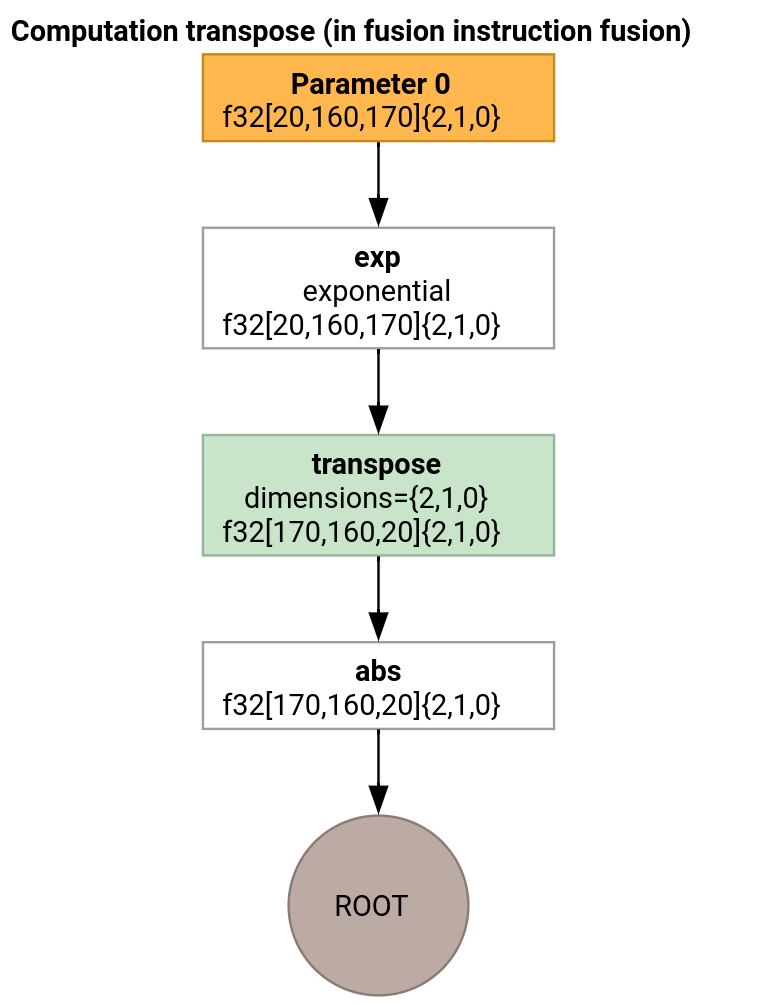
転置エミッタは、エントリ関数の生成方法でのみループ エミッタと異なります。
func.func @transpose(%arg0: tensor<20x160x170xf32>, %arg1: tensor<170x160x20xf32>) -> tensor<170x160x20xf32> {
  %thread_id_x = gpu.thread_id  x {xla.range = [0 : index, 127 : index]}
  %block_id_x = gpu.block_id  x {xla.range = [0 : index, 959 : index]}

  %shmem = xla_gpu.allocate_shared : tensor<32x1x33xf32>
  %xla_loop = xla_gpu.loop (%thread_id_x, %block_id_x)[%i, %j]
      -> (%input_dim0, %input_dim1, %input_dim2, %shmem_dim0, %shmem_dim1, %shmem_dim2)
      in #map iter_args(%iter = %shmem) -> (tensor<32x1x33xf32>) {
    %extracted = tensor.extract %arg0[%input_dim0, %input_dim1, %input_dim2] : tensor<20x160x170xf32>
    %0 = math.exp %extracted : f32
    %inserted = tensor.insert %0 into %iter[%shmem_dim0, %shmem_dim1, %shmem_dim2] : tensor<32x1x33xf32>
    xla_gpu.yield %inserted : tensor<32x1x33xf32>
  }

  %synced_tensor = xla_gpu.sync_threads %xla_loop : tensor<32x1x33xf32>

  %xla_loop_0 = xla_gpu.loop (%thread_id_x %block_id_x)[%i, %j] -> (%dim0, %dim1, %dim2)
      in #map1 iter_args(%iter = %arg1) -> (tensor<170x160x20xf32>) {
    // indexing computations
    %extracted = tensor.extract %synced_tensor[%0, %c0, %1] : tensor<32x1x33xf32>
    %2 = math.absf %extracted : f32
    %inserted = tensor.insert %2 into %iter[%3, %4, %1] : tensor<170x160x20xf32>
    xla_gpu.yield %inserted : tensor<170x160x20xf32>
  }
  return %xla_loop_0 : tensor<170x160x20xf32>
}
この場合、2 つの xla_gpu.loop オペレーションが生成されます。1 つ目は、入力から統合読み取りを実行し、結果を共有メモリに書き込みます。
共有メモリ テンソルは xla_gpu.allocate_shared オペレーションを使用して作成されます。
xla_gpu.sync_threads を使用してスレッドが同期されると、2 番目の xla_gpu.loop は共有メモリ テンソルから要素を読み取り、出力に対して統合書き込みを実行します。
再現ツール
コンパイル パイプラインの各パスの後に IR を確認するには、--xla_dump_emitter_re=mlir-fusion フラグを指定して run_hlo_module を起動します。
run_hlo_module --platform=CUDA --xla_disable_all_hlo_passes --reference_platform="" /tmp/gelu.hlo --xla_dump_emitter_re=mlir-fusion --xla_dump_to=<some_directory>
ここで、/tmp/gelu.hlo には
HloModule m:

gelu {
  %param = bf16[6,512,4096] parameter(0)
  %constant_0 = bf16[] constant(0.5)
  %bcast_0 = bf16[6,512,4096] broadcast(bf16[] %constant_0), dimensions={}
  %constant_1 = bf16[] constant(1)
  %bcast_1 = bf16[6,512,4096] broadcast(bf16[] %constant_1), dimensions={}
  %constant_2 = bf16[] constant(0.79785)
  %bcast_2 = bf16[6,512,4096] broadcast(bf16[] %constant_2), dimensions={}
  %constant_3 = bf16[] constant(0.044708)
  %bcast_3 = bf16[6,512,4096] broadcast(bf16[] %constant_3), dimensions={}
  %square = bf16[6,512,4096] multiply(bf16[6,512,4096] %param, bf16[6,512,4096] %param)
  %cube = bf16[6,512,4096] multiply(bf16[6,512,4096] %square, bf16[6,512,4096] %param)
  %multiply_3 = bf16[6,512,4096] multiply(bf16[6,512,4096] %cube, bf16[6,512,4096] %bcast_3)
  %add_1 = bf16[6,512,4096] add(bf16[6,512,4096] %param, bf16[6,512,4096] %multiply_3)
  %multiply_2 = bf16[6,512,4096] multiply(bf16[6,512,4096] %add_1, bf16[6,512,4096] %bcast_2)
  %tanh_0 = bf16[6,512,4096] tanh(bf16[6,512,4096] %multiply_2)
  %add_0 = bf16[6,512,4096] add(bf16[6,512,4096] %tanh_0, bf16[6,512,4096] %bcast_1)
  %multiply_1 = bf16[6,512,4096] multiply(bf16[6,512,4096] %add_0, bf16[6,512,4096] %bcast_0)
  ROOT %multiply_0 = bf16[6,512,4096] multiply(bf16[6,512,4096] %param, bf16[6,512,4096] %multiply_1)
}

ENTRY main {
  %param = bf16[6,512,4096] parameter(0)
  ROOT fusion = bf16[6,512,4096] fusion(%param), kind=kLoop, calls=gelu
}
コードへのリンク
- コンパイル パイプライン: emitter_base.h
- 最適化と変換パス: backends/gpu/codegen/emitters/transforms
- パーティション ロジック: computation_partitioner.h
- ヒーローベースのエミッタ: backends/gpu/codegen/emitters
- XLA:GPU ops: xla_gpu_ops.td
- 正確性テストとリテラル テスト: backends/gpu/codegen/emitters/tests